Cowork: Claude Code power for knowledge work | Claude by Anthropic
Delegate to Claude, delight in the result
Hand off a task, get a polished deliverable. Spend less time finding, formatting, and fixing with Claude Cowork.
Download Claude
Download ClaudeDownload Claude
Talk to sales
Talk to salesTalk to sales
Play videoPlay video
Power through tedious tasks
Unlike Chat, Cowork lets Claude complete work on its own. Describe the outcome and cadence, and it takes action and keeps you informed. Come back to the result.
Schedule tasks
Organize files
Build spreadsheets
Prepare reports
Analyze notes
Active
Note
Interact with the data—hover and toggle views to uncover patterns
Prompt
Pull my metrics from the analytics dashboard and drop them in the weekly report template every Friday.
Attachments
Quarterly Performance
977 lines
csv
Strategic Metrics
92 kb
json

Set it once, skip the ask
With scheduled tasks, you can have Claude check your email every morning, pull metrics, or run your weekly Slack digest. You define the cadence once. Claude handles it from there.
Prompt
Help me organize my Downloads folder. Scan the contents and propose a plan: - Categories/folders to create - How files should be sorted - Any naming conventions to apply - Files to flag for review or deletion Show me the plan before making changes. Only proceed after I approve.
Working folder
/Downloads
Downloads/
├── Documents/
│ ├── 2024-03-15_invoice.pdf
│ ├── 2024-03-22_invoice.pdf
│ ├── 2024-03-20_meeting-notes.txt
│ ├── resume_john-smith_2024.pdf
│ └── untitled_document.docx
│
├── Spreadsheets/
│ └── 2024_q3-budget_v3.xlsx
│
├── Presentations/
│ └── presentation-draft.pptx
│
├── Images/
│ ├── photo_2024-03-15_4392.jpg
│ ├── photo_2024-03-15_4393.jpg
│ ├── photo_2024-03-18_4401.heic
│ ├── screenshot_2024-03-15_finder-window.png
│ └── screenshot_2024-03-22_slack-conversation.png
│
├── Audio & Video/
│ ├── 2024-03-20_zoom-recording.mp4
│ └── audio_recording.m4a
│
├── Archives/
│ └── random_download.zip
│
└── Duplicates/
├── Document(1).pdf
├── Document(2).pdf
├── meeting-notes(1).txt
└── 2024_q3-budget_v2.xlsx
Organize and rename files
Point Claude at your Downloads folder. It sorts files by type, renames them with sensible conventions, and cleans up months of clutter in minutes.
Turn screenshots into spreadsheets
Hand Claude a pile of receipts, invoices, or screenshots. Come back to a formatted spreadsheet with all the data extracted and organized.
Prepare branded reports, documents, and decks
Combine your company templates with source materials. Claude follows your formatting conventions and produces polished docs, decks, or reports. Schedule a task to update daily, weekly, or monthly to keep it fresh and accurate.
Prompt
Draft a Q1 product update report. Pull from all my meeting notes and project docs in the attached folder. Focus on launch milestones, key decisions, and what's shipping next.
Working folder
/Documents/01_23-Product-Meeting
Q1 Product Update
January 2026 • Draft
Executive Summary
Q1 marked a pivotal quarter for the product team. We successfully launched Dashboard v2, completed a major API overhaul, and entered beta for our mobile application. These milestones position us well for Q1's enterprise expansion.
Launch Milestones
- July 28: Dashboard v2 shipped to all users
- Aug 15: API v3 migration complete
- Sep 5: Mobile beta launched (iOS)
Key Decisions
Based on stakeholder feedback (Jan 12), the team decided to prioritize enterprise features over consumer expansion. The pricing model was revised to support...
What's Next
Q2 priorities include Android beta launch (Apr), enterprise SSO (May), and analytics dashboard expansion...
Draft reports from scattered notes
Give Claude access to your notes folder. It reads through everything, identifies the relevant pieces, and produces a first draft ready for your review.
Now in Beta
Message Claude from anywhere, come back when it’s done
Pair your phone
Pair your phonePair your phone
Message from your phone
Send a task to Claude from your phone. It picks up where you left off and remembers how you work.
Claude works on your computer
Anything you can do on your computer, Claude can do. Open apps, fill spreadsheets, navigate your browser. No setup, no passwords handed off.
You get the result
Claude delivers finished work instead of step-by-step updates: a formatted spreadsheet, a memo, a briefing doc. You review, refine, and decide what's next.
How it works
Find Cowork in your desktop app, alongside Chat and Code. Switch to Cowork when you want Claude to execute non-coding tasks.
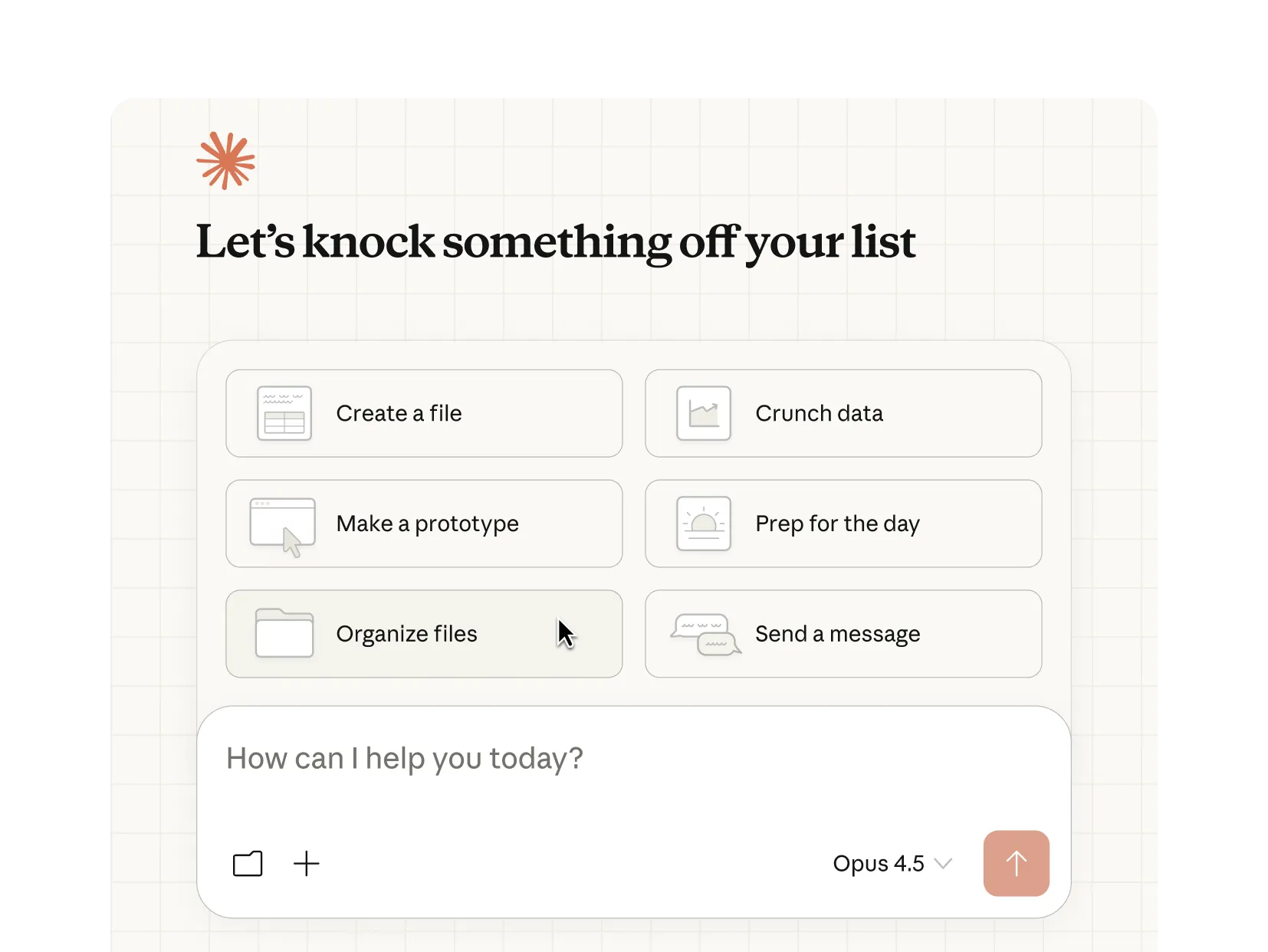
Describe what you need
Tell Claude what you want from your desktop or phone. Claude picks the fastest path: a connector for Slack, Chrome for web research, or your screen to open apps when there's no direct integration.
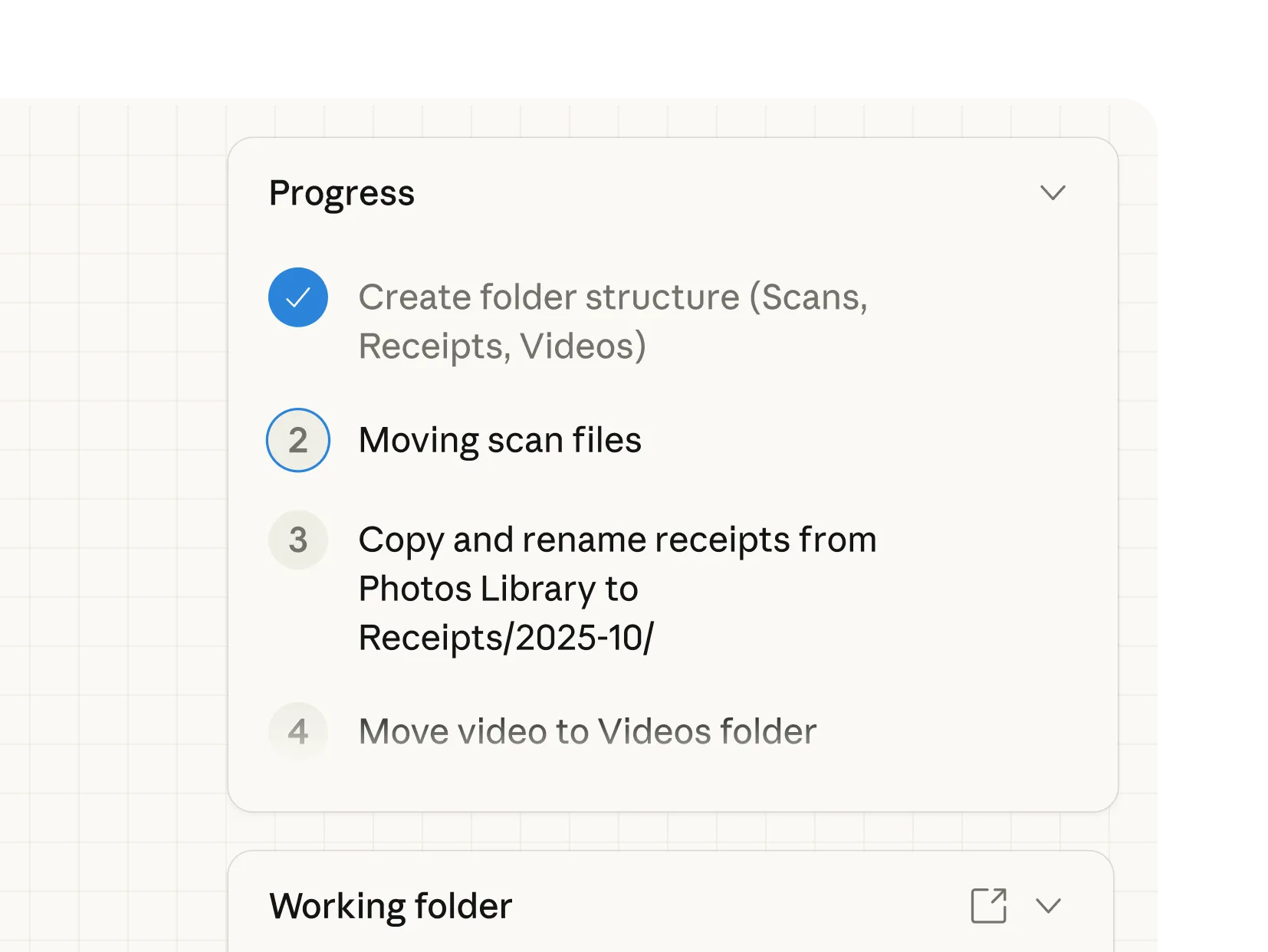
Claude does the work
Claude works through each step, looping you in before anything significant. Watch in real time or walk away. For recurring tasks, tell Claude once and it handles the rest.
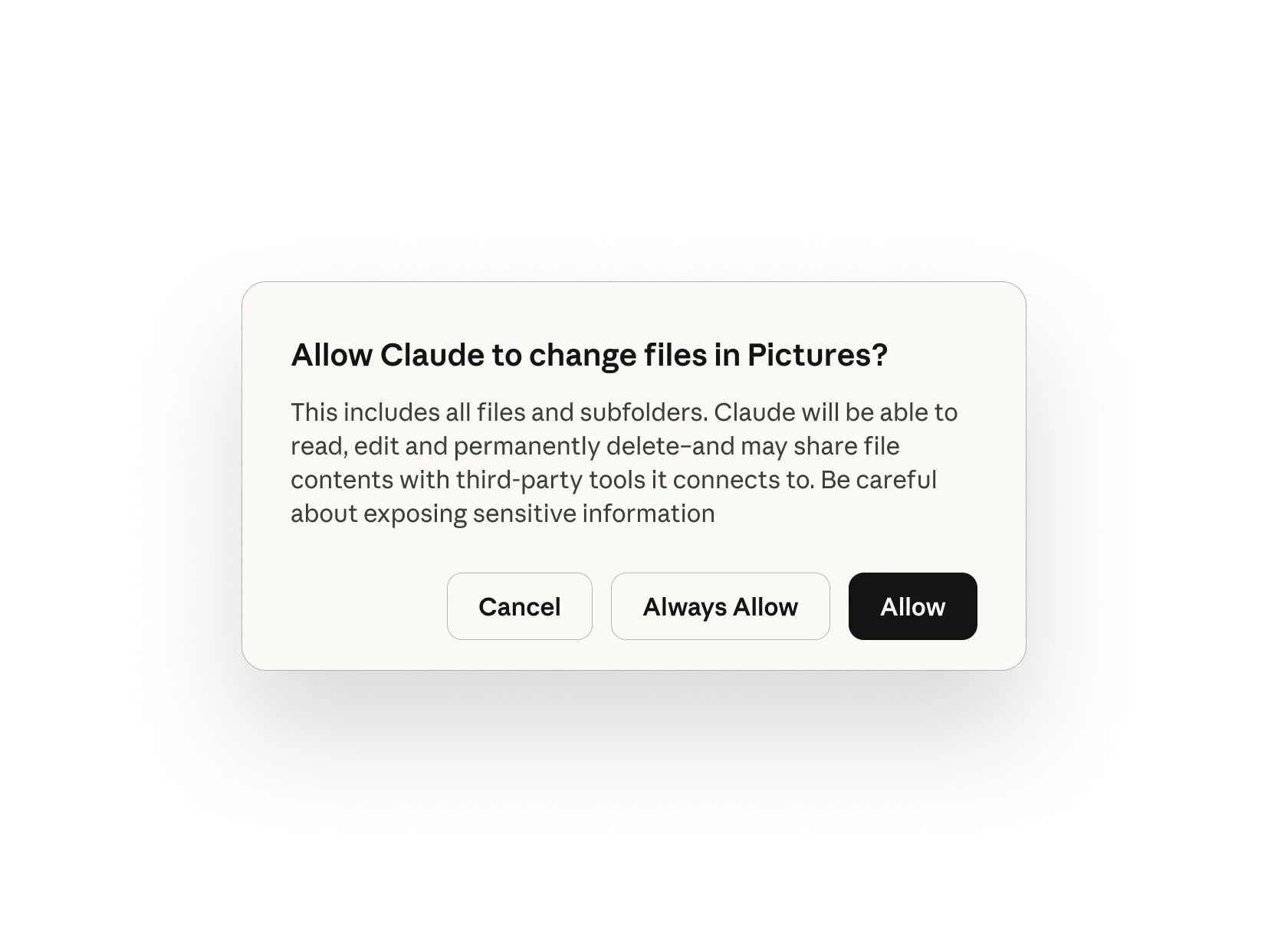
You’re in control
You choose which folders and connectors Claude can access. Before Claude acts, it shows you the plan and waits for your approval. Redirect, refine, or take a different approach at any step.
Latest feature announcements
Enterprise deployment: Manage feature access, control spend, and track Claude Cowork usage across the orgEnterprise deployment: Manage feature access, control spend, and track Claude Cowork usage across the org
Enterprise deployment: Manage feature access, control spend, and track Claude Cowork usage across the org
Blog
BlogBlog
Apr 8, 2026
Dispatch: Put Claude to work on your computerDispatch: Put Claude to work on your computer
Dispatch: Put Claude to work on your computer
Blog
BlogBlog
Mar 23, 2026
Plugin marketplace: Admins can now create private plugin marketplacesPlugin marketplace: Admins can now create private plugin marketplaces
Plugin marketplace: Admins can now create private plugin marketplaces
Blog
BlogBlog
Feb 24, 2026
Customize Claude for your team with plugins
Plugins bundle your team's tools, knowledge, and workflows into a single install so Claude shows up as a specialist from day one.
Browse plugins
Browse pluginsBrowse plugins
Skills
Domain knowledge and best practices baked in
Connectors
Claude connects to the tools your team already uses
Sub-agents
Specialized agents that handle specific tasks end-to-end
Customize Cowork with plugins

Bundle any skills, connectors, and sub-agents together to turn Claude into a specialist for your role, team, and company.
Read more
Read moreRead more
Plugins
Brand voice (by Tribe AI)
Analyze your existing documents, marketing materials, and conversations to distill your brand's voice into clear, enforceable guidelines.
Learn more
Learn moreLearn more
NextNext

Plugins
Legal
Speed up contract review, NDA triage, and compliance workflows for in-house legal teams.
Learn more
Learn moreLearn more
NextNext
Plugins
Finance
Streamline finance workflows: journal entries, reconciliation, financial statements, and variance analysis.
Learn more
Learn moreLearn more
NextNext
PrevPrev
NextNext
PrevPrev
NextNext
Supports every industry
Administrative
Create a daily briefing
Generate a daily briefing that pulls from Slack, Notion, and GitHub to surface priorities and connections you'd miss scanning each platform separately.
Learn more
Learn moreLearn more
Research and Analysis
Size a market
Point Cowork at a market question and get an analysis with professional deliverables. Claude researches, calculates, and provides PowerPoint presentations or Excel workbooks.
Learn more
Learn moreLearn more
Sales and GTM
Aggregate customer feedback
Synthesize feedback from call transcripts, Slack, CRM notes, and Linear issues to identify cross-platform patterns and generate prioritized product ideas.
Learn more
Learn moreLearn more
Legal and Compliance
Manage legal documents
Turn a folder of lawsuit documents into a chronologically organized exhibit set with descriptive titles and strategic importance assessment.
Learn more
Learn moreLearn more


"I connected Cowork to our tech stack — org database, Slack, Jira — and asked it to find our engineering operational bottlenecks. Claude came back with an interactive dashboard, team-by-team efficiency analyses, and a prioritized roadmap for Build Operations, and I could keep going deeper on any finding. Product and Design Ops saw it and immediately started building their own."
Larisa Cavallaro, AI Automation Engineer
Read story
Read storyRead story

“Cowork helps teams do work at a scale that was hard to justify before. The human role becomes validation, refinement, and decision-making. Not repetitive rework.”
Joel Hron, CTO
Read story
Read storyRead story
“We built a skill that turns a complex performance review spreadsheet — seven competency facets, branching logic by level and role — into a guided, interactive experience in Cowork. What would have required a team of engineers building a custom React app, Cowork delivered in 45 minutes. And it's more adaptive than anything we would have built.”
Matt Benyo, Director of AI Initiatives
Read story
Read storyRead story
Stay in control
Claude Cowork takes real actions on your files and in connected tools. Enterprise admins can configure permissions to customize security according to their needs.
Read our safety guide
Read our safety guideRead our safety guide
You decide what Claude can access
You choose which folders and connectors Claude can see and it can't access anything without your explicit permission.
Learn more
Learn moreLearn more
By default, Claude asks before acting
Before taking significant actions, Claude shows you what it plans to do and waits for your approval. You can redirect, refine, or take a different approach at any step. Always confirm before Claude handles financial, personal, or work-critical tasks.
Now, you can give it permission to take action without approval. Your choice.
For Teams & Enterprise users
Claude Cowork conversation history is stored locally on your device. Administrators can toggle it on or off at their discretion. Avoid granting access to local files with sensitive information, like financial documents.
Claude Cowork streams tool calls, file access, and approval states to your SIEM through OpenTelemetry, enabling data mapping to the Compliance API.
Deployment flexibility
Access through a Claude account or your existing cloud provider (Amazon Bedrock, Google Cloud's Vertex Al, or Microsoft Foundry).
Learn more
Learn moreLearn more
Claude Cowork is generally available

See the new enterprise controls for deploying it across your org, plus hear from PayPal on their rollout.
Register
RegisterRegister
PrevPrev
NextNext
Get started with Claude
Choose a plan, then download the desktop app to start using Claude Cowork.
Individual
Team & Enterprise
Active
Pro
Claude Cowork is included in your Pro plan. Perfect for quick tasks like organizing a folder or pulling together a short report.
$17
Per month with annual subscription discount ($200 billed up front). $20 if billed monthly. Claude Cowork consumes limits faster than Chat. For heavy usage, consider upgrading.
Try Claude
Try ClaudeTry Claude
Max 5x
Claude Cowork is included in your Max plan. Great value for everyday use on longer, more complex tasks.
$100
Per month
Try Claude
Try ClaudeTry Claude
Max 20x
Even more Claude Cowork included in your Max plan. Best for power users who hand off work throughout the day.
$200
Per month
Try Claude
Try ClaudeTry Claude
Team
Claude Cowork and the Slack connector are included in your Team plan standard and premium seats. Includes self-serve seat management and extra usage of the API rates.
$20
Per seat / month. For teams of 5 to 75.
Get Team plan
Get Team planGet Team plan
Enterprise
Claude Cowork is included in your Enterprise plan. Admin controls, usage analytics, Analytics API and OpenTelemetry observability available. Cowork activity is not yet captured in audit logs or Compliance API.
Get Enterprise plan
Get Enterprise planGet Enterprise plan
Usage limits apply. Prices shown don’t include applicable tax. Price and plans are subject to change at Anthropic's discretion.
FAQ
What is Claude Cowork?
Cowork is Anthropic's agentic AI system for knowledge work. It runs on desktop, connects to local files and applications, and completes multi-step tasks from start to finish. The user defines the goal. Cowork figures out how to get there.
What’s the difference between Claude Cowork and Chat?
In regular chat, Claude responds to your messages but can't access your files directly. In Cowork, Claude has permission to read, edit, and create files in folders you specify—so it can actually complete tasks rather than just describe how to do them.
What's the difference between Claude Cowork and Claude Code?
Desktop app users can start a task in Claude Desktop and let it handle work in the browser without switching windows by enabling Claude in Chrome as a connector. Claude Code is a command-line tool designed for developers. Cowork brings the same agentic architecture to the desktop app, designed for non-coding knowledge work. No terminal required.
Can I assign tasks to Claude from my phone?
Yes, now in research preview for Pro and Max subscribers. You'll need both the Claude desktop and mobile apps at their latest versions, then you need to pair them. Your desktop needs to be running and your computer needs to be awake. Claude does the work on your desktop and sends you the result. This feature is rolling out gradually and may not be available to all eligible users immediately.
What does computer use mean?
Computer use lets Claude interact directly with your screen to open apps, navigate your browser, or run tools. Claude reaches for your connectors and integrations first, falls back to your browser when needed, and only uses your screen as a last resort. This matters because using a direct integration is faster and more precise than navigating through the screen.
When Claude does interact with your screen, it asks permission before accessing each application. You see what it's doing and can stop it at any step. Computer use is in research preview for both Cowork and Claude Code.
What kind of files can Claude Cowork read, create, edit, and analyze?
Cowork can understand the following file types:
- Documents and text: Word documents (.docx, .doc), PDF files (.pdf), Plain text (.txt), Markdown (.md), HTML (.html), JSON (.json), CSV (.csv), TSV (.tsv)
- Spreadsheets: Excel files (.xlsx, .xls, .xlsm)
- Presentations: PowerPoint files (.pptx, .ppt)
- Images: Common formats like .png, .jpg, .jpeg, .gif, .svg, .webp
- Data and config: YAML (.yaml, .yml), XML (.xml), TOML (.toml)
- Notebooks: Jupyter notebooks (.ipynb)
- Code files: Pretty much any programming language: Python (.py), JavaScript (.js), TypeScript (.ts), React (.jsx, .tsx), Java, C/C++, Go, Rust, Ruby, PHP, SQL, shell scripts, etc.
You can also use Connectors to view additional files.
Does Claude Cowork use more of my rate limit?
Yes, agentic tasks consume more capacity than regular chat. Claude coordinates multiple sub-agents and tool calls to complete complex work.
Can admins control Claude Cowork access?
Yes. Admins can toggle Claude Cowork off for their organization anytime in Admin Settings. Manage Cowork access across teams with role-based access controls.
Getting started with Claude Cowork
This article explains how to use Claude Cowork, a research preview that brings Claude Code's agentic capabilities to Claude Desktop for knowledge work beyond coding.
Read more
Read moreRead more
PrevPrev
NextNext
Get started with Claude Cowork
Lorem ipsum dolor sit amet, consectetur adipiscing elit suspendisse varius.
Download Claude
Download ClaudeDownload Claude
Upgrade plan
Upgrade planUpgrade plan