Introducing routines in Claude Code | Claude
Introducing routines in Claude Code
Define repeatable routines that work your backlog, review your PRs, and respond to events in the cloud.
- Category
- Product
Claude Code
- Date
April 14, 2026
- Reading time
5
min
- Share
Copy link
https://claude.com/blog/introducing-routines-in-claude-code
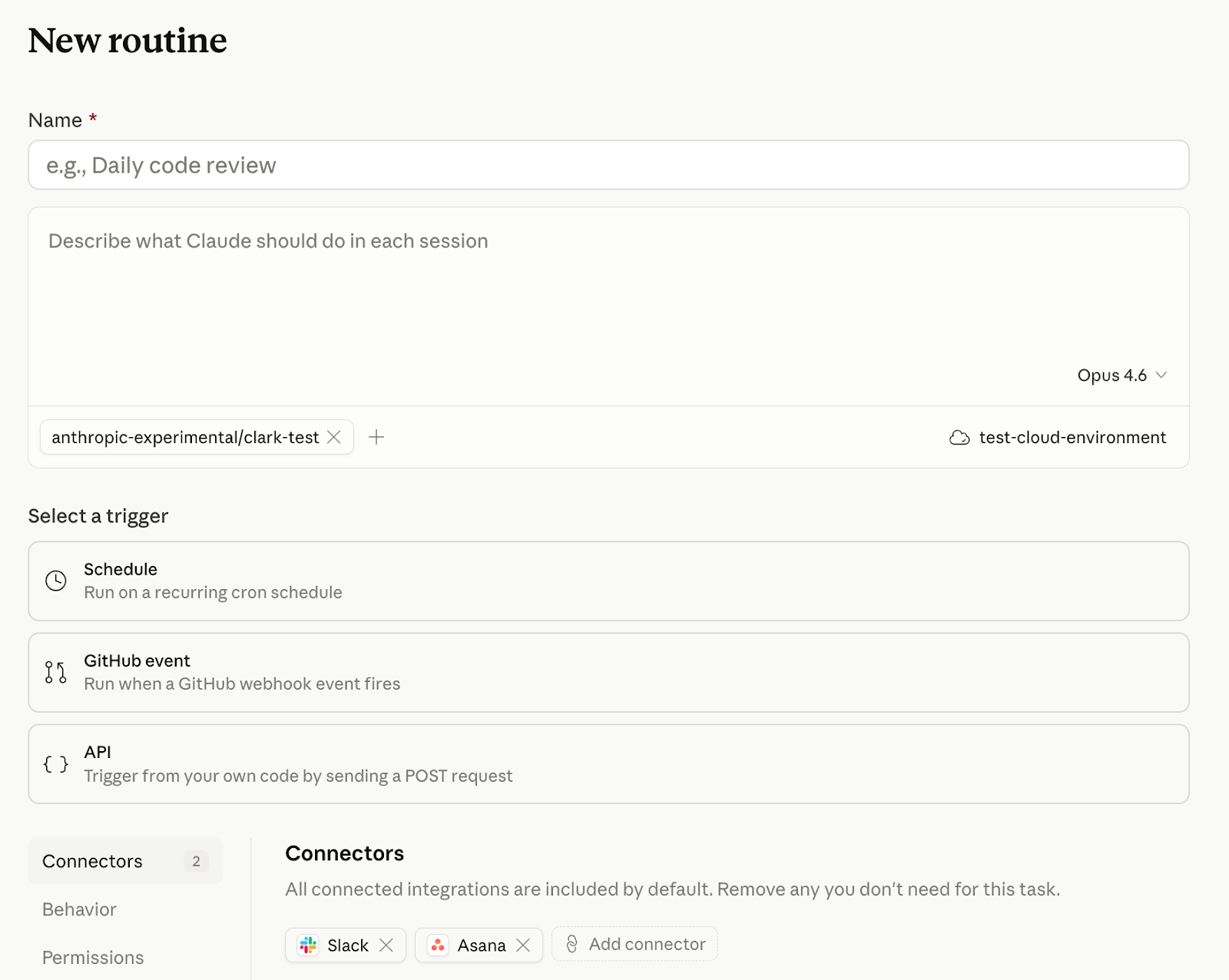
Today, we're introducing routines in Claude Code in research preview. A routine is a Claude Code automation you configure once — including a prompt, repo, and connectors — and then run on a schedule, from an API call, or in response to an event. Routines run on Claude Code’s web infrastructure, so nothing depends on your laptop being open.
Developers already use Claude Code to automate the software development cycle, but until now, they've managed cron jobs, infrastructure, and additional tooling like MCP servers themselves. Routines ship with access to your repos and your connectors, so you can package up automations and set them to run on a schedule or trigger.
How it works
Scheduled routines
Give Claude Code a prompt and a cadence (hourly, nightly, or weekly) and it runs on that schedule:
Every night at 2am: pull the top bug from Linear, attempt a fix, and open a draft PR.
If you're using /schedule in the CLI, those tasks are now scheduled routines.
API routines
You can also configure routines to be triggered by API calls. Every routine gets its own endpoint and auth token. POST a message, get back a session URL. Wire Claude Code into your alerting, your deploy hooks, your internal tools—anywhere you can make an HTTP request:
Read the alert payload, find the owning service, and post a triage summary to #oncall with a proposed first step.
Webhook routines, starting with GitHub
Subscribe a routine to automatically kick off in response to GitHub repository events. Claude will create a new session for every PR matching your filters and run your routine.
Please flag PRs that touch the /auth-provider module. Any changes to this module need to be summarized and posted to #auth-changes.
Claude opens one session per PR and will continue to feed updates from that PR to the session, so it can address follow-ups like comments and CI failures.
We plan to expand webhook-based routines to trigger from more event sources in the future.
What teams are building
A few common patterns have emerged for early users creating routines:
Scheduled routines
- Backlog management: triage new issues nightly, label, assign, and post a summary to Slack
- Docs drift: scan merged PRs weekly, flag docs that reference changed APIs, and open update PRs
API routines
- Deploy verification: your CD pipeline posts after each deploy, Claude runs smoke checks against the new build, scans error logs for regressions, and posts a go/no-go to the release channel
- Alert triage: point Datadog at the routine's endpoint, Claude pulls the trace, correlates it with recent deployments, and has a draft fix waiting before on-call opens the page
- Feedback resolution: a docs feedback widget or internal dashboard posts the report, Claude opens a session against the repo with the issue in context, and drafts the change
GitHub routines
- Library port: every PR merged to a Python SDK triggers a routine that ports the change to the parallel Go SDK, and opens a matching PR
- Bespoke code review: on PR opened, run your team's own checklist across security and performance, leaving inline comments before a human reviewer looks
Getting started
Routines are available today for Claude Code users on Pro, Max, Team, and Enterprise plans with Claude Code on the web enabled. Head to claude.ai/code to create your first routine, or type /schedule in the CLI.
Routines draw down subscription usage limits in the same way as interactive sessions. In addition, routines have daily limits: Pro users can run up to 5 routines per day, Max users can run up to 15 routines per day, and Team and Enterprise users can run up to 25 routines per day. You can run extra routines beyond these limits with extra usage. See the docs for more information.
No items found.
PrevPrev
0/5
NextNext
eBook

FAQ
No items found.
Get Claude Code
curl -fsSL https://claude.ai/install.sh | bash
Copy command to clipboard
irm https://claude.ai/install.ps1 | iex
Copy command to clipboard
Or read the documentation
Try Claude Code
Try Claude CodeTry Claude Code
Developer docs
Developer docsDeveloper docs
Related posts
Explore more product news and best practices for teams building with Claude.
May 28, 2026
Introducing dynamic workflows in Claude Code
Product announcements
Introducing dynamic workflows in Claude CodeIntroducing dynamic workflows in Claude Code
Introducing dynamic workflows in Claude CodeIntroducing dynamic workflows in Claude Code

Jun 9, 2026
New in Claude Managed Agents: run agents on a schedule and store environment variables in vaults
Product announcements
New in Claude Managed Agents: run agents on a schedule and store environment variables in vaultsNew in Claude Managed Agents: run agents on a schedule and store environment variables in vaults
New in Claude Managed Agents: run agents on a schedule and store environment variables in vaultsNew in Claude Managed Agents: run agents on a schedule and store environment variables in vaults

Jun 8, 2026
Building intelligent apps for Apple platforms with Claude in the Foundation Models framework
Product announcements
Building intelligent apps for Apple platforms with Claude in the Foundation Models frameworkBuilding intelligent apps for Apple platforms with Claude in the Foundation Models framework
Building intelligent apps for Apple platforms with Claude in the Foundation Models frameworkBuilding intelligent apps for Apple platforms with Claude in the Foundation Models framework

Jun 8, 2026
Observability for developers building connectors
Product announcements
Observability for developers building connectorsObservability for developers building connectors
Observability for developers building connectorsObservability for developers building connectors
Transform how your organization operates with Claude
See pricing
See pricingSee pricing
Contact sales
Contact salesContact sales
Get the developer newsletter
Product updates, how-tos, community spotlights, and more. Delivered monthly to your inbox.
SubscribeSubscribe
Thank you! You’re subscribed.
Sorry, there was a problem with your submission, please try again later.