Qwen/Qwen3.6-35B-A3B · Hugging Face
/
like 2.07k
Follow
Qwen 88k
Image-Text-to-Text Transformers Safetensors qwen3_5_moe conversational Eval Results
License: apache-2.0
Model card Files Files and versions xet Community 66
Deploy
Copy to bucket new
Use this model
Instructions to use Qwen/Qwen3.6-35B-A3B with libraries, inference providers, notebooks, and local apps. Follow these links to get started.
- Libraries
- Transformers
How to use Qwen/Qwen3.6-35B-A3B with Transformers:
Use a pipeline as a high-level helper
from transformers import pipeline
pipe = pipeline("image-text-to-text", model="Qwen/Qwen3.6-35B-A3B") messages = [ { "role": "user", "content": [ {"type": "image", "url": "https://huggingface.co/datasets/huggingface/documentation-images/resolve/main/p-blog/candy.JPG"}, {"type": "text", "text": "What animal is on the candy?"} ] }, ] pipe(text=messages)
Load model directly
from transformers import AutoProcessor, AutoModelForMultimodalLM
processor = AutoProcessor.from_pretrained("Qwen/Qwen3.6-35B-A3B") model = AutoModelForMultimodalLM.from_pretrained("Qwen/Qwen3.6-35B-A3B") messages = [ { "role": "user", "content": [ {"type": "image", "url": "https://huggingface.co/datasets/huggingface/documentation-images/resolve/main/p-blog/candy.JPG"}, {"type": "text", "text": "What animal is on the candy?"} ] }, ] inputs = processor.apply_chat_template( messages, add_generation_prompt=True, tokenize=True, return_dict=True, return_tensors="pt", ).to(model.device)
outputs = model.generate(**inputs, max_new_tokens=40) print(processor.decode(outputs[0][inputs["input_ids"].shape[-1]:]))
- Inference
- Inference Providers
- HuggingChat
- Notebooks
- Google Colab
- Kaggle
- AMD Developer Cloud
- Local Apps Settings
- vLLM
How to use Qwen/Qwen3.6-35B-A3B with vLLM:
Install from pip and serve model
Install vLLM from pip:
pip install vllm
Start the vLLM server:
vllm serve "Qwen/Qwen3.6-35B-A3B"
Call the server using curl (OpenAI-compatible API):
curl -X POST "http://localhost:8000/v1/chat/completions" \ -H "Content-Type: application/json" \ --data '{ "model": "Qwen/Qwen3.6-35B-A3B", "messages": [ { "role": "user", "content": [ { "type": "text", "text": "Describe this image in one sentence." }, { "type": "image_url", "image_url": { "url": "https://cdn.britannica.com/61/93061-050-99147DCE/Statue-of-Liberty-Island-New-York-Bay.jpg" } } ] } ] }'
Use Docker
docker model run hf.co/Qwen/Qwen3.6-35B-A3B
How to use Qwen/Qwen3.6-35B-A3B with SGLang:
Install from pip and serve model
Install SGLang from pip:
pip install sglang
Start the SGLang server:
python3 -m sglang.launch_server \ --model-path "Qwen/Qwen3.6-35B-A3B" \ --host 0.0.0.0 \ --port 30000
Call the server using curl (OpenAI-compatible API):
curl -X POST "http://localhost:30000/v1/chat/completions" \ -H "Content-Type: application/json" \ --data '{ "model": "Qwen/Qwen3.6-35B-A3B", "messages": [ { "role": "user", "content": [ { "type": "text", "text": "Describe this image in one sentence." }, { "type": "image_url", "image_url": { "url": "https://cdn.britannica.com/61/93061-050-99147DCE/Statue-of-Liberty-Island-New-York-Bay.jpg" } } ] } ] }'
Use Docker images
docker run --gpus all \
--shm-size 32g \
-p 30000:30000 \
-v ~/.cache/huggingface:/root/.cache/huggingface \
--env "HF_TOKEN=
Call the server using curl (OpenAI-compatible API):
curl -X POST "http://localhost:30000/v1/chat/completions" \ -H "Content-Type: application/json" \ --data '{ "model": "Qwen/Qwen3.6-35B-A3B", "messages": [ { "role": "user", "content": [ { "type": "text", "text": "Describe this image in one sentence." }, { "type": "image_url", "image_url": { "url": "https://cdn.britannica.com/61/93061-050-99147DCE/Statue-of-Liberty-Island-New-York-Bay.jpg" } } ] } ] }'
How to use Qwen/Qwen3.6-35B-A3B with Docker Model Runner:
docker model run hf.co/Qwen/Qwen3.6-35B-A3B
-
Browse Quantizations to use this model in llama.cpp, Ollama, LM Studio, or any compatible app.
-
Qwen3.6-35B-A3B
- Qwen3.6 Highlights
- Model Overview
- Benchmark Results
- Language
- Vision Language
- Quickstart
- Serving Qwen3.6
- Using Qwen3.6 via the Chat Completions API
- Agentic Usage
- Qwen-Agent
- Qwen Code
- Processing Ultra-Long Texts
- Best Practices
- Citation
Qwen3.6-35B-A3B
This repository contains model weights and configuration files for the post-trained model in the Hugging Face Transformers format.
These artifacts are compatible with Hugging Face Transformers, vLLM, SGLang, KTransformers, etc.
Following the February release of the Qwen3.5 series, we're pleased to share the first open-weight variant of Qwen3.6. Built on direct feedback from the community, Qwen3.6 prioritizes stability and real-world utility, offering developers a more intuitive, responsive, and genuinely productive coding experience.
Qwen3.6 Highlights
This release delivers substantial upgrades, particularly in
- Agentic Coding: the model now handles frontend workflows and repository-level reasoning with greater fluency and precision.
- Thinking Preservation: we've introduced a new option to retain reasoning context from historical messages, streamlining iterative development and reducing overhead.
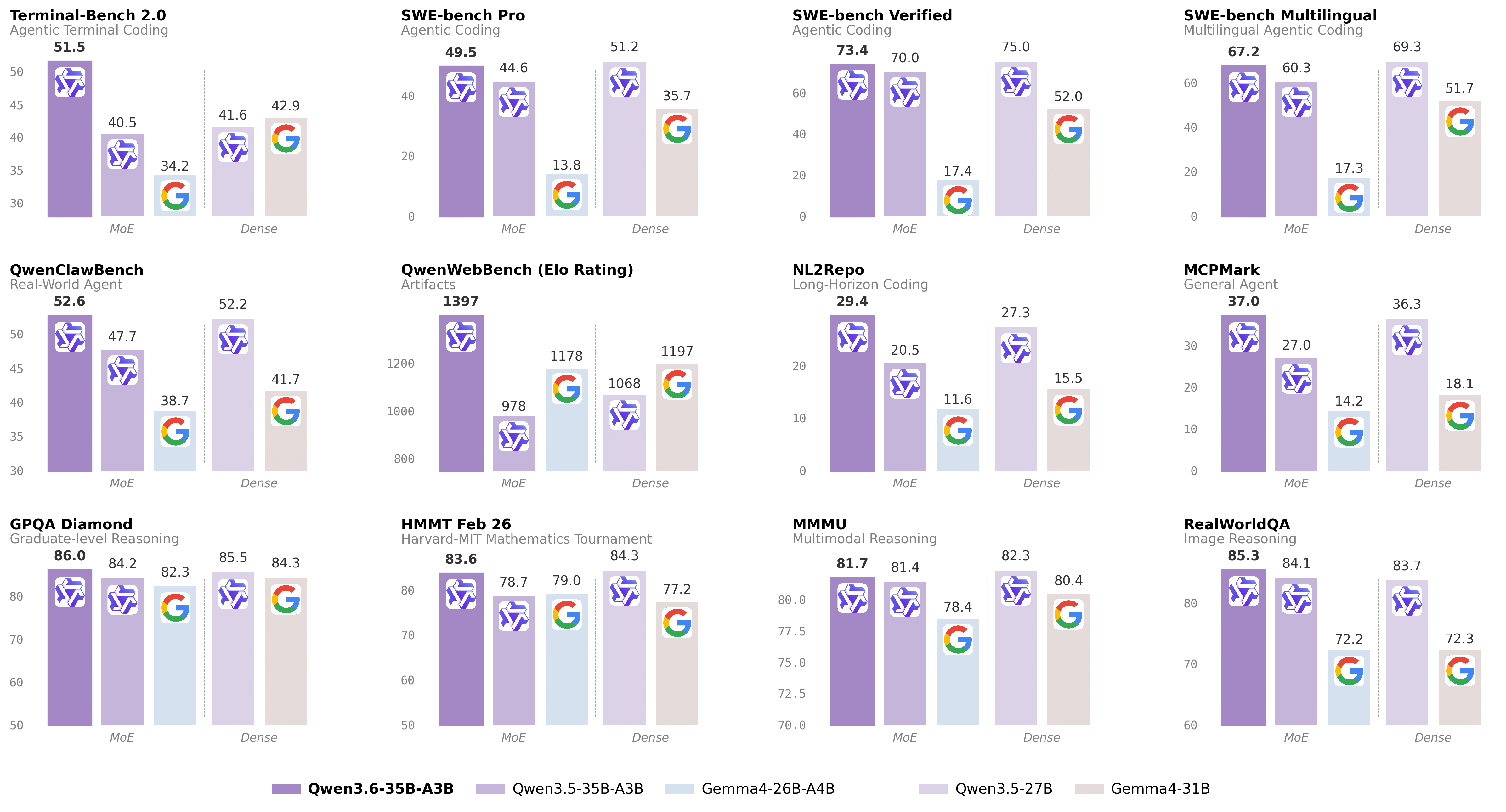
For more details, please refer to our blog post Qwen3.6-35B-A3B.
Model Overview
- Type: Causal Language Model with Vision Encoder
- Training Stage: Pre-training & Post-training
- Language Model
- Number of Parameters: 35B in total and 3B activated
- Hidden Dimension: 2048
- Token Embedding: 248320 (Padded)
- Number of Layers: 40
- Hidden Layout: 10 × (3 × (Gated DeltaNet → MoE) → 1 × (Gated Attention → MoE))
- Gated DeltaNet:
- Number of Linear Attention Heads: 32 for V and 16 for QK
- Head Dimension: 128
- Gated Attention:
- Number of Attention Heads: 16 for Q and 2 for KV
- Head Dimension: 256
- Rotary Position Embedding Dimension: 64
- Mixture Of Experts
- Number of Experts: 256
- Number of Activated Experts: 8 Routed + 1 Shared
- Expert Intermediate Dimension: 512
- LM Output: 248320 (Padded)
- MTP: trained with multi-steps
- Context Length: 262,144 natively and extensible up to 1,010,000 tokens.
Benchmark Results
Language
Qwen3.5-27B| Gemma4-31B| Qwen3.5-35BA3B| Gemma4-26BA4B| Qwen3.6-35BA3B
Coding Agent SWE-bench Verified | 75.0 | 52.0 | 70.0 | 17.4 | 73.4 SWE-bench Multilingual | 69.3 | 51.7 | 60.3 | 17.3 | 67.2 SWE-bench Pro | 51.2 | 35.7 | 44.6 | 13.8 | 49.5 Terminal-Bench 2.0 | 41.6 | 42.9 | 40.5 | 34.2 | 51.5 Claw-Eval Avg | 64.3 | 48.5 | 65.4 | 58.8 | 68.7 Claw-Eval Pass^3 | 46.2 | 25.0 | 51.0 | 28.0 | 50.0 SkillsBench Avg5 | 27.2 | 23.6 | 4.4 | 12.3 | 28.7 QwenClawBench | 52.2 | 41.7 | 47.7 | 38.7 | 52.6 NL2Repo | 27.3 | 15.5 | 20.5 | 11.6 | 29.4 QwenWebBench | 1068 | 1197 | 978 | 1178 | 1397 General Agent TAU3-Bench | 68.4 | 67.5 | 68.9 | 59.0 | 67.2 VITA-Bench | 41.8 | 43.0 | 29.1 | 36.9 | 35.6 DeepPlanning | 22.6 | 24.0 | 22.8 | 16.2 | 25.9 Tool Decathlon | 31.5 | 21.2 | 28.7 | 12.0 | 26.9 MCPMark | 36.3 | 18.1 | 27.0 | 14.2 | 37.0 MCP-Atlas | 68.4 | 57.2 | 62.4 | 50.0 | 62.8 WideSearch | 66.4 | 35.2 | 59.1 | 38.3 | 60.1 Knowledge MMLU-Pro | 86.1 | 85.2 | 85.3 | 82.6 | 85.2 MMLU-Redux | 93.2 | 93.7 | 93.3 | 92.7 | 93.3 SuperGPQA | 65.6 | 65.7 | 63.4 | 61.4 | 64.7 C-Eval | 90.5 | 82.6 | 90.2 | 82.5 | 90.0 STEM & Reasoning GPQA | 85.5 | 84.3 | 84.2 | 82.3 | 86.0 HLE | 24.3 | 19.5 | 22.4 | 8.7 | 21.4 LiveCodeBench v6 | 80.7 | 80.0 | 74.6 | 77.1 | 80.4 HMMT Feb 25 | 92.0 | 88.7 | 89.0 | 91.7 | 90.7 HMMT Nov 25 | 89.8 | 87.5 | 89.2 | 87.5 | 89.1 HMMT Feb 26 | 84.3 | 77.2 | 78.7 | 79.0 | 83.6 IMOAnswerBench | 79.9 | 74.5 | 76.8 | 74.3 | 78.9 AIME26 | 92.6 | 89.2 | 91.0 | 88.3 | 92.7
- SWE-Bench Series: Internal agent scaffold (bash + file-edit tools); temp=1.0, top_p=0.95, 200K context window. We correct some problematic tasks in the public set of SWE-bench Pro and evaluate all baselines on the refined benchmark.
- Terminal-Bench 2.0: Harbor/Terminus-2 harness; 3h timeout, 32 CPU/48 GB RAM; temp=1.0, top_p=0.95, top_k=20, max_tokens=80K, 256K ctx; avg of 5 runs.
- SkillsBench: Evaluated via OpenCode on 78 tasks (self-contained subset, excluding API-dependent tasks); avg of 5 runs.
- NL2Repo: Others are evaluated via Claude Code (temp=1.0, top_p=0.95, max_turns=900).
- QwenClawBench: An internal real-user-distribution Claw agent benchmark (open-sourcing soon); temp=0.6, 256K ctx.
- QwenWebBench: An internal front-end code generation benchmark; bilingual (EN/CN), 7 categories (Web Design, Web Apps, Games, SVG, Data Visualization, Animation, and 3D); auto-render + multimodal judge (code/visual correctness); BT/Elo rating system.
- TAU3-Bench: We use the official user model (gpt-5.2, low reasoning effort) + default BM25 retrieval.
- VITA-Bench: Avg subdomain scores; using claude-4-sonnet as judger, as the official judger (claude-3.7-sonnet) is no longer available.
- MCPMark: GitHub MCP v0.30.3; Playwright responses truncated at 32K tokens.
- MCP-Atlas: Public set score; gemini-2.5-pro judger.
- AIME 26: We use the full AIME 2026 (I & II), where the scores may differ from Qwen 3.5 notes.
Vision Language
Qwen3.5-27B| Claude-Sonnet-4.5| Gemma4-31B| Gemma4-26BA4B| Qwen3.5-35B-A3B| Qwen3.6-35B-A3B
STEM and Puzzle MMMU | 82.3 | 79.6 | 80.4 | 78.4 | 81.4 | 81.7 MMMU-Pro | 75.0 | 68.4 | 76.9 | 73.8 | 75.1 | 75.3 Mathvista(mini) | 87.8 | 79.8 | 79.3 | 79.4 | 86.2 | 86.4 ZEROBench_sub | 36.2 | 26.3 | 26.0 | 26.3 | 34.1 | 34.4 General VQA RealWorldQA | 83.7 | 70.3 | 72.3 | 72.2 | 84.1 | 85.3 MMBenchEN-DEV-v1.1 | 92.6 | 88.3 | 90.9 | 89.0 | 91.5 | 92.8 SimpleVQA | 56.0 | 57.6 | 52.9 | 52.2 | 58.3 | 58.9 HallusionBench | 70.0 | 59.9 | 67.4 | 66.1 | 67.9 | 69.8 Text Recognition and Document Understanding OmniDocBench1.5 | 88.9 | 85.8 | 80.1 | 74.4 | 89.3 | 89.9 CharXiv(RQ) | 79.5 | 67.2 | 67.9 | 69.0 | 77.5 | 78.0 CC-OCR | 81.0 | 68.1 | 75.7 | 74.5 | 80.7 | 81.9 AI2D_TEST | 92.9 | 87.0 | 89.0 | 88.3 | 92.6 | 92.7 Spatial Intelligence RefCOCO(avg) | 90.9 | -- | -- | -- | 89.2 | 92.0 ODInW13 | 41.1 | -- | -- | -- | 42.6 | 50.8 EmbSpatialBench | 84.5 | 71.8 | -- | -- | 83.1 | 84.3 RefSpatialBench | 67.7 | -- | -- | -- | 63.5 | 64.3 Video Understanding VideoMME(w sub.) | 87.0 | 81.1 | -- | -- | 86.6 | 86.6 VideoMME(w/o sub.) | 82.8 | 75.3 | -- | -- | 82.5 | 82.5 VideoMMMU | 82.3 | 77.6 | 81.6 | 76.0 | 80.4 | 83.7 MLVU | 85.9 | 72.8 | -- | -- | 85.6 | 86.2 MVBench | 74.6 | -- | -- | -- | 74.8 | 74.6 LVBench | 73.6 | -- | -- | -- | 71.4 | 71.4
- Empty cells (--) indicate scores not available or not applicable.
Quickstart
For streamlined integration, we recommend using Qwen3.6 via APIs. Below is a guide to use Qwen3.6 via OpenAI-compatible API.
Serving Qwen3.6
Qwen3.6 can be served via APIs with popular inference frameworks. In the following, we show example commands to launch OpenAI-Compatible API servers for Qwen3.6 models.
Inference efficiency and throughput vary significantly across frameworks. We recommend using the latest framework versions to ensure optimal performance and compatibility. For production workloads or high-throughput scenarios, dedicated serving engines such as SGLang, KTransformers or vLLM are strongly recommended.
The model has a default context length of 262,144 tokens. If you encounter out-of-memory (OOM) errors, consider reducing the context window. However, because Qwen3.6 leverages extended context for complex tasks, we advise maintaining a context length of at least 128K tokens to preserve thinking capabilities.
SGLang
SGLang is a fast serving framework for large language models and vision language models. sglang>=0.5.10 is recommended for Qwen3.6, which can be installed using the following command in a fresh environment:
uv pip install sglang[all]
See its documentation for more details.
The following will create API endpoints at http://localhost:8000/v1:
- Standard Version : The following command can be used to create an API endpoint with maximum context length 262,144 tokens using tensor parallel on 8 GPUs.
python -m sglang.launch_server --model-path Qwen/Qwen3.6-35B-A3B --port 8000 --tp-size 8 --mem-fraction-static 0.8 --context-length 262144 --reasoning-parser qwen3
- Tool Use : To support tool use, you can use the following command.
python -m sglang.launch_server --model-path Qwen/Qwen3.6-35B-A3B --port 8000 --tp-size 8 --mem-fraction-static 0.8 --context-length 262144 --reasoning-parser qwen3 --tool-call-parser qwen3_coder
- Multi-Token Prediction (MTP) : The following command is recommended for MTP:
python -m sglang.launch_server --model-path Qwen/Qwen3.6-35B-A3B --port 8000 --tp-size 8 --mem-fraction-static 0.8 --context-length 262144 --reasoning-parser qwen3 --speculative-algo NEXTN --speculative-num-steps 3 --speculative-eagle-topk 1 --speculative-num-draft-tokens 4
For detailed deployment guide, see the SGLang Qwen3.5 Cookbook.
vLLM
vLLM is a high-throughput and memory-efficient inference and serving engine for LLMs. vllm>=0.19.0 is recommended for Qwen3.6, which can be installed using the following command in a fresh environment:
uv pip install vllm --torch-backend=auto
See its documentation for more details.
The following will create API endpoints at http://localhost:8000/v1:
- Standard Version : The following command can be used to create an API endpoint with maximum context length 262,144 tokens using tensor parallel on 8 GPUs.
vllm serve Qwen/Qwen3.6-35B-A3B --port 8000 --tensor-parallel-size 8 --max-model-len 262144 --reasoning-parser qwen3
- Tool Call : To support tool use, you can use the following command.
vllm serve Qwen/Qwen3.6-35B-A3B --port 8000 --tensor-parallel-size 8 --max-model-len 262144 --reasoning-parser qwen3 --enable-auto-tool-choice --tool-call-parser qwen3_coder
- Multi-Token Prediction (MTP) : The following command is recommended for MTP:
vllm serve Qwen/Qwen3.6-35B-A3B --port 8000 --tensor-parallel-size 8 --max-model-len 262144 --reasoning-parser qwen3 --speculative-config '{"method":"qwen3_next_mtp","num_speculative_tokens":2}'
- Text-Only : The following command skips the vision encoder and multimodal profiling to free up memory for additional KV cache:
vllm serve Qwen/Qwen3.6-35B-A3B --port 8000 --tensor-parallel-size 8 --max-model-len 262144 --reasoning-parser qwen3 --language-model-only
For detailed deployment guide, see the vLLM Qwen3.5 Recipe.
KTransformers
KTransformers is a flexible framework for experiencing cutting-edge LLM inference optimizations with CPU-GPU heterogeneous computing. For running Qwen3.6 with KTransformers, see the KTransformers Deployment Guide.
Hugging Face Transformers
Hugging Face Transformers contains a lightweight server which can be used for quick testing and moderate load deployment. The latest transformers is required for Qwen3.6:
pip install "transformers[serving]"
See its documentation for more details. Please also make sure torchvision and pillow are installed.
Then, run transformers serve to launch a server with API endpoints at http://localhost:8000/v1; it will place the model on accelerators if available:
transformers serve Qwen/Qwen3.6-35B-A3B --port 8000 --continuous-batching
Using Qwen3.6 via the Chat Completions API
The chat completions API is accessible via standard HTTP requests or OpenAI SDKs. Here, we show examples using the OpenAI Python SDK.
Before starting, make sure it is installed and the API key and the API base URL is configured, e.g.:
pip install -U openai
Set the following accordingly
export OPENAI_BASE_URL="http://localhost:8000/v1" export OPENAI_API_KEY="EMPTY"
We recommend using the following set of sampling parameters for generation
- Thinking mode for general tasks:
temperature=1.0, top_p=0.95, top_k=20, min_p=0.0, presence_penalty=1.5, repetition_penalty=1.0- Thinking mode for precise coding tasks (e.g. WebDev):
temperature=0.6, top_p=0.95, top_k=20, min_p=0.0, presence_penalty=0.0, repetition_penalty=1.0- Instruct (or non-thinking) mode:
temperature=0.7, top_p=0.80, top_k=20, min_p=0.0, presence_penalty=1.5, repetition_penalty=1.0Please note that the support for sampling parameters varies according to inference frameworks.
Qwen3.6 models operate in thinking mode by default, generating thinking content signified by
<think>\n...</think>\n\nbefore producing the final responses. To disable thinking content and obtain direct response, refer to the examples here.
Text-Only Input
from openai import OpenAI
Configured by environment variables
client = OpenAI()
messages = [ {"role": "user", "content": "Type \"I love Qwen3.6\" backwards"}, ]
chat_response = client.chat.completions.create( model="Qwen/Qwen3.6-35B-A3B", messages=messages, max_tokens=81920, temperature=1.0, top_p=0.95, presence_penalty=1.5, extra_body={ "top_k": 20, }, ) print("Chat response:", chat_response)
Image Input
from openai import OpenAI
Configured by environment variables
client = OpenAI()
messages = [ { "role": "user", "content": [ { "type": "image_url", "image_url": { "url": "https://qianwen-res.oss-accelerate.aliyuncs.com/Qwen3.5/demo/CI_Demo/mathv-1327.jpg" } }, { "type": "text", "text": "The centres of the four illustrated circles are in the corners of the square. The two big circles touch each other and also the two little circles. With which factor do you have to multiply the radii of the little circles to obtain the radius of the big circles?\nChoices:\n(A) $\frac{2}{9}$\n(B) $\sqrt{5}$\n(C) $0.8 \cdot \pi$\n(D) 2.5\n(E) $1+\sqrt{2}$" } ] } ]
chat_response = client.chat.completions.create( model="Qwen/Qwen3.6-35B-A3B", messages=messages, max_tokens=81920, temperature=1.0, top_p=0.95, presence_penalty=1.5, extra_body={ "top_k": 20, }, ) print("Chat response:", chat_response)
Video Input
from openai import OpenAI
Configured by environment variables
client = OpenAI()
messages = [ { "role": "user", "content": [ { "type": "video_url", "video_url": { "url": "https://qianwen-res.oss-accelerate.aliyuncs.com/Qwen3.5/demo/video/N1cdUjctpG8.mp4" } }, { "type": "text", "text": "How many porcelain jars were discovered in the niches located in the primary chamber of the tomb?" } ] } ]
When vLLM is launched with --media-io-kwargs '{"video": {"num_frames": -1}}',
video frame sampling can be configured via extra_body (e.g., by setting fps).
This feature is currently supported only in vLLM.
By default, fps=2 and do_sample_frames=True.
With do_sample_frames=True, you can customize the fps value to set your desired video sampling rate.
chat_response = client.chat.completions.create( model="Qwen/Qwen3.6-35B-A3B", messages=messages, max_tokens=81920, temperature=1.0, top_p=0.95, presence_penalty=1.5, extra_body={ "top_k": 20, "mm_processor_kwargs": {"fps": 2, "do_sample_frames": True}, }, )
print("Chat response:", chat_response)
Instruct (or Non-Thinking) Mode
Qwen3.6 does not officially support the soft switch of Qwen3, i.e.,
/thinkand/nothink.
Qwen3.6 will think by default before response. You can obtain direct response from the model without thinking by configuring the API parameters. For example,
from openai import OpenAI
Configured by environment variables
client = OpenAI()
messages = [ { "role": "user", "content": [ { "type": "image_url", "image_url": { "url": "https://qianwen-res.oss-accelerate.aliyuncs.com/Qwen3.6/demo/RealWorld/RealWorld-04.png" } }, { "type": "text", "text": "Where is this?" } ] } ]
chat_response = client.chat.completions.create( model="Qwen/Qwen3.6-35B-A3B", messages=messages, max_tokens=32768, temperature=0.7, top_p=0.8, presence_penalty=1.5, extra_body={ "top_k": 20, "chat_template_kwargs": {"enable_thinking": False}, }, ) print("Chat response:", chat_response)
If you are using APIs from Alibaba Cloud Model Studio, in addition to changing
model, please use"enable_thinking": Falseinstead of"chat_template_kwargs": {"enable_thinking": False}.
Preserve Thinking
By default, only the thinking blocks generated in handling the latest user message is retained, resulting in a pattern commonly as interleaved thinking. Qwen3.6 has been additionally trained to preserve and leverage thinking traces from historical messages. You can enable this behavior by setting the preserve_thinking option:
from openai import OpenAI
Configured by environment variables
client = OpenAI()
messages = [...]
chat_response = client.chat.completions.create( model="Qwen/Qwen3.6-35B-A3B", messages=messages, max_tokens=32768, temperature=0.7, top_p=0.8, presence_penalty=1.5, extra_body={ "top_k": 20, "chat_template_kwargs": {"preserve_thinking": True}, }, ) print("Chat response:", chat_response)
If you are using APIs from Alibaba Cloud Model Studio, in addition to changing
model, please use"preserve_thinking": Trueinstead of"chat_template_kwargs": {"preserve_thinking": False}.
This capability is particularly beneficial for agent scenarios, where maintaining full reasoning context can enhance decision consistency and, in many cases, reduce overall token consumption by minimizing redundant reasoning. Additionally, it can improve KV cache utilization, optimizing inference efficiency in both thinking and non-thinking modes.
Agentic Usage
Qwen3.6 excels in tool calling capabilities.
Qwen-Agent
We recommend using Qwen-Agent to quickly build Agent applications with Qwen3.6.
To define the available tools, you can use the MCP configuration file, use the integrated tool of Qwen-Agent, or integrate other tools by yourself.
import os from qwen_agent.agents import Assistant
Define LLM
Using Alibaba Cloud Model Studio
llm_cfg = {
Use the OpenAI-compatible model service provided by DashScope:
'model': 'Qwen3.6-35B-A3B', 'model_type': 'qwenvl_oai', 'model_server': 'https://dashscope.aliyuncs.com/compatible-mode/v1', 'api_key': os.getenv('DASHSCOPE_API_KEY'),
'generate_cfg': { 'use_raw_api': True,
When using Dash Scope OAI API, pass the parameter of whether to enable thinking mode in this way
'extra_body': { 'enable_thinking': True, 'preserve_thinking': True, }, }, }
Using OpenAI-compatible API endpoint.
functionality of the deployment frameworks and let Qwen-Agent automate the related operations.
llm_cfg = {
# Use your own model service compatible with OpenAI API by vLLM/SGLang:
'model': 'Qwen/Qwen3.6-35B-A3B',
'model_type': 'qwenvl_oai',
'model_server': 'http://localhost:8000/v1', # api_base
'api_key': 'EMPTY',
'generate_cfg': {
'use_raw_api': True,
# When using vLLM/SGLang OAI API, pass the parameter of whether to enable thinking mode in this way
'extra_body': {
'chat_template_kwargs':
},
},
}
Define Tools
tools = [ {'mcpServers': { # You can specify the MCP configuration file "filesystem": { "command": "npx", "args": ["-y", "@modelcontextprotocol/server-filesystem", "/Users/xxxx/Desktop"] } } } ]
Define Agent
bot = Assistant(llm=llm_cfg, function_list=tools)
Streaming generation
messages = [{'role': 'user', 'content': 'Help me organize my desktop.'}] for responses in bot.run(messages=messages): pass print(responses)
Streaming generation
messages = [{'role': 'user', 'content': 'Develop a dog website and save it on the desktop'}] for responses in bot.run(messages=messages): pass print(responses)
Qwen Code
Qwen Code is an open-source AI agent for the terminal, optimized for Qwen models. It helps you understand large codebases, automate tedious work, and ship faster.
For more information, please refer to Qwen Code.
Processing Ultra-Long Texts
Qwen3.6 natively supports context lengths of up to 262,144 tokens. For long-horizon tasks where the total length (including both input and output) exceeds this limit, we recommend using RoPE scaling techniques to handle long texts effectively., e.g., YaRN.
YaRN is currently supported by several inference frameworks, e.g., transformers, vllm, ktransformers and sglang. In general, there are two approaches to enabling YaRN for supported frameworks:
- Modifying the model configuration file: In the
config.jsonfile, change therope_parametersfields intext_configto:
{ "mrope_interleaved": true, "mrope_section": [ 11, 11, 10 ], "rope_type": "yarn", "rope_theta": 10000000, "partial_rotary_factor": 0.25, "factor": 4.0, "original_max_position_embeddings": 262144, }
- Passing command line arguments:
For vllm, you can use
VLLM_ALLOW_LONG_MAX_MODEL_LEN=1 vllm serve ... --hf-overrides '{"text_config": {"rope_parameters": {"mrope_interleaved": true, "mrope_section": [11, 11, 10], "rope_type": "yarn", "rope_theta": 10000000, "partial_rotary_factor": 0.25, "factor": 4.0, "original_max_position_embeddings": 262144}}}' --max-model-len 1010000
For sglang and ktransformers, you can use
SGLANG_ALLOW_OVERWRITE_LONGER_CONTEXT_LEN=1 python -m sglang.launch_server ... --json-model-override-args '{"text_config": {"rope_parameters": {"mrope_interleaved": true, "mrope_section": [11, 11, 10], "rope_type": "yarn", "rope_theta": 10000000, "partial_rotary_factor": 0.25, "factor": 4.0, "original_max_position_embeddings": 262144}}}' --context-length 1010000
All the notable open-source frameworks implement static YaRN, which means the scaling factor remains constant regardless of input length, potentially impacting performance on shorter texts. We advise modifying the
rope_parametersconfiguration only when processing long contexts is required. It is also recommended to modify thefactoras needed. For example, if the typical context length for your application is 524,288 tokens, it would be better to setfactoras 2.0.
Best Practices
To achieve optimal performance, we recommend the following settings:
-
Sampling Parameters :
-
We suggest using the following sets of sampling parameters depending on the mode and task type:
- Thinking mode for general tasks :
temperature=1.0,top_p=0.95,top_k=20,min_p=0.0,presence_penalty=1.5,repetition_penalty=1.0 - Thinking mode for precise coding tasks (e.g., WebDev) :
temperature=0.6,top_p=0.95,top_k=20,min_p=0.0,presence_penalty=0.0,repetition_penalty=1.0 - Instruct (or non-thinking) mode :
temperature=0.7,top_p=0.80,top_k=20,min_p=0.0,presence_penalty=1.5,repetition_penalty=1.0 - For supported frameworks, you can adjust the
presence_penaltyparameter between 0 and 2 to reduce endless repetitions. However, using a higher value may occasionally result in language mixing and a slight decrease in model performance. -
Adequate Output Length : We recommend using an output length of 32,768 tokens for most queries. For benchmarking on highly complex problems, such as those found in math and programming competitions, we suggest setting the max output length to 81,920 tokens. This provides the model with sufficient space to generate detailed and comprehensive responses, thereby enhancing its overall performance.
-
Standardize Output Format : We recommend using prompts to standardize model outputs when benchmarking.
-
Math Problems : Include "Please reason step by step, and put your final answer within \boxed{}." in the prompt.
- Multiple-Choice Questions : Add the following JSON structure to the prompt to standardize responses: "Please show your choice in the
answerfield with only the choice letter, e.g.,"answer": "C"." - Long Video Understanding : To optimize inference efficiency for plain text and images, the
sizeparameter in the releasedvideo_preprocessor_config.jsonis conservatively configured. It is recommended to set thelongest_edgeparameter in the video_preprocessor_config file to 469,762,048 (corresponding to 224k video tokens) to enable higher frame-rate sampling for hour-scale videos and thereby achieve superior performance. For example,
{"longest_edge": 469762048, "shortest_edge": 4096}
Alternatively, override the default values via engine startup parameters. For implementation details, refer to: vLLM / SGLang.
Citation
If you find our work helpful, feel free to give us a cite.
@misc{qwen36_35b_a3b, title = {{Qwen3.6-35B-A3B}: Agentic Coding Power, Now Open to All}, url = {https://qwen.ai/blog?id=qwen3.6-35b-a3b}, author = {{Qwen Team}}, month = {April}, year = {2026} }
Downloads last month 5,129,777
Safetensors
Model size
36B params
Tensor type
BF16
·
Chat template
Files info
Inference Providers NEW
Featherless AI
Examples
Input a message to start chatting with Qwen/Qwen3.6-35B-A3B.
Send
View Code Snippets
Model tree for Qwen/Qwen3.6-35B-A3B
Adapters
Finetunes
Merges
Quantizations
Spaces using Qwen/Qwen3.6-35B-A3B 39
🔧 curtburk/vLLM_on_NVIDIA_GB10 🧪 KyleHessling1/qwopus36-35b-a3b-eval 🧠 artificialguybr/Qwen3.6-35B-A3B-zero 🤖 Yash030/claude-code-proxy 📜 yuukicammy/kuzushiji-ocr 🚀 ashirato/surrogate-1-shard1 🚀 surrogate1/surrogate-1-shard2 🧠 sinanmut/Qwen3.6-35B-A3B-zero + 34 Spaces + 31 Spaces
Collection including Qwen/Qwen3.6-35B-A3B
Qwen3.6 Collection 4 items • Updated Apr 22 • 399
Evaluation results
- Diamond on Idavidrein/gpqa View evaluation results leaderboard
86
- SWE Bench Pro on ScaleAI/SWE-bench_Pro View evaluation results leaderboard
49.5
- Mmlu Pro on TIGER-Lab/MMLU-Pro View evaluation results leaderboard
85.2
- Swe Bench Resolved on SWE-bench/SWE-bench_Verified View evaluation results leaderboard
73.4
- Terminalbench 2 on harborframework/terminal-bench-2.0 View evaluation results leaderboard
51.5 *
44.1 *
- Text Content on llamaindex/ParseBench View evaluation results source leaderboard
90.7 *
- Text Formatting on llamaindex/ParseBench View evaluation results source leaderboard
58.3 *
Expand 15 evaluations