An open-source spec for Codex orchestration: Symphony. | OpenAI
April 27, 2026
An open-source spec for Codex orchestration: Symphony
By Alex Kotliarskyi, Victor Zhu, and Zach Brock
Loading…
Share
Six months ago, while working on an internal productivity tool, our team made a controversial (at the time) decision: we’d build our repo with no human-written code. Every line in our project repository had to be generated by Codex.
To make that work, we redesigned our engineering workflow from the ground up. We built an agent-friendly repository, invested heavily in automated tests and guardrails, and treated Codex as a full-fledged teammate. We documented that journey in our previous blog post on harness engineering .
And it worked, but then we ran into the next bottleneck: context switching.
To solve this new problem, we built a system called Symphony. Symphony (opens in a new window) is an agent orchestrator that turns a project-management board like Linear into a control plane for coding agents. Every open task gets an agent, agents run continuously, and humans review the results.
This post explains how we created Symphony—resulting in a 500% increase in landed pull requests on some teams—and how to use it to turn your own issue tracker into an always-on agent orchestrator.
The ceiling of interactive coding agents
Even as they get easier to use, coding agents—whether accessed through web apps or CLI—are still interactive tools.
As the scale of agentic work increased at OpenAI, we found a new kind of burden. Each engineer would open a few Codex sessions, assign tasks, review the output, steer the agent, and repeat. In practice, most people could comfortably manage three to five sessions at a time before context switching became painful. Beyond that, productivity dropped. We'd forget which session was doing what, jump between terminals to nudge agents back on track, and debug long-running tasks that stalled halfway through.
The agents were fast, but we had a system bottleneck: human attention. We had effectively built a team of extremely capable junior engineers, then assigned our human engineers to micromanaging them. That wasn’t going to scale.
A shift in perspective
We realized we were optimizing the wrong thing. We were orienting our system around coding sessions and merged PRs, when PRs and sessions are really a means to an end. Software workflows are largely organized around deliverables: issues, tasks, tickets, milestones.
So we asked ourselves what would happen if we stopped supervising agents directly and instead let them pull work from our task tracker.
That idea became Symphony, a written spec that functions as a supervisor to orchestrate agentic work.
Turning our issue tracker into an agent orchestrator
Symphony started with a simple concept: any open task should get picked up and completed by an agent. Instead of managing Codex sessions in multiple tabs, we made our issue tracker the control plane.
In this setup, each open Linear issue maps to a dedicated agent workspace. Symphony continuously watches the task board and ensures that every active task has an agent running in the loop until it’s done. If an agent crashes or stalls, Symphony restarts it. If new work appears, Symphony picks it up and starts organizing work.
We built our workflow based on ticket statuses, using the task manager Linear as a state machine.
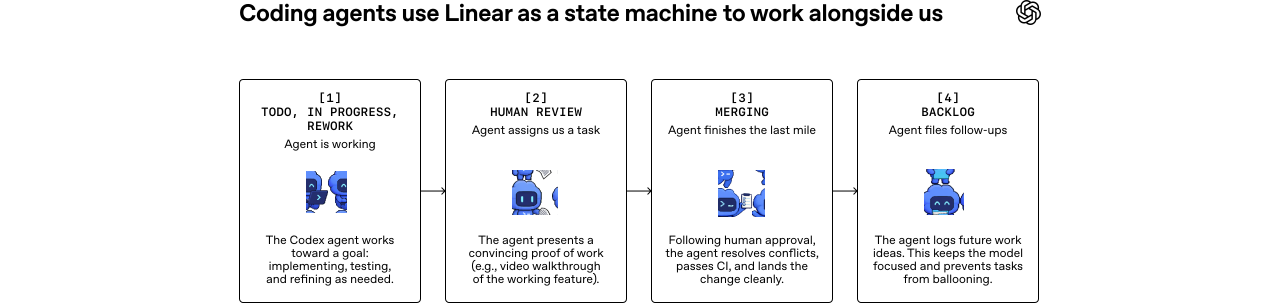
In practice, Symphony decouples work from sessions and from pull requests. Some issues produce multiple PRs across repos; others are pure investigation or analysis that never touch the codebase.
Once work is abstracted this way, tickets can represent much larger units of work.
We regularly use Symphony to orchestrate complex features and infrastructure migrations. For example, we might file a task asking the agent to analyze the codebase, Slack, or Notion and produce an implementation plan. Once we’re happy with the plan, the agent generates a tree of tasks, breaking the work into stages and defining dependencies between tasks.
Agents only start working on tasks that aren’t blocked, so execution unfolds naturally and optimally in parallel for this DAG (a sequence of execution steps). For example, we marked the React upgrade as blocked on a migration to Vite. As expected, agents started upgrading React only after the migration to Vite was complete.
Agents can also create work themselves. During implementation or review, they often notice improvements that fall outside the scope of the current task: a performance issue, a refactoring opportunity, or a better architecture. When that happens, they simply file a new issue that we can evaluate and schedule later—many of these follow-up tasks also get picked up by agents. While we oversee this process, agents stay organized and keep work moving forward.
This way of working dramatically reduces the cognitive cost of kicking off ambiguous work. If the agent gets something wrong, that’s still useful information, and the cost to us is near zero. We can very cheaply file tickets for the agent to go prototype and explore, and throw away any explorations we don’t like.
Because the orchestrator runs on devboxes and never sleeps, we can add tasks from anywhere and know an agent will pick it up. For instance, one engineer on our team made three significant changes from the Linear app on his phone from a cozy cabin on shoddy wifi.
An increase in exploration from working this way
When observing the effects of working with Symphony, the most obvious change was output. Among some teams at OpenAI, we saw the number of landed PRs increase by 500% in the first three weeks. Outside of OpenAI, Linear founder Karri Saarinen highlighted a spike in workspaces created(opens in a new window) as we released Symphony. However, the deeper shift is how teams think about work.
When our engineers no longer spend time supervising Codex sessions, the economics of code changes completely. The perceived cost of each change drops because we’re no longer investing human effort in driving the implementation itself.
That changed our behavior. It's become trivial to spin up speculative tasks in Symphony. Try an idea, explore a refactor, test a hypothesis, and only keep the results that look promising.
It also broadens who can initiate work. Our product manager and designer can now file feature requests directly into Symphony. They don’t need to check out the repo or manage a Codex session. They describe the feature and get back a review packet that includes a video walkthrough of the feature working inside the real product.
Symphony also shines in large monorepos (like the one we have at OpenAI) where the last mile of landing a PR is slow and fragile. The system watches CI, rebases when needed, resolves conflicts, retries flaky checks, and generally shepherds changes through the pipeline. By the time a ticket reaches Merging , we have high confidence the change will make it into the main branch without human babysitting.
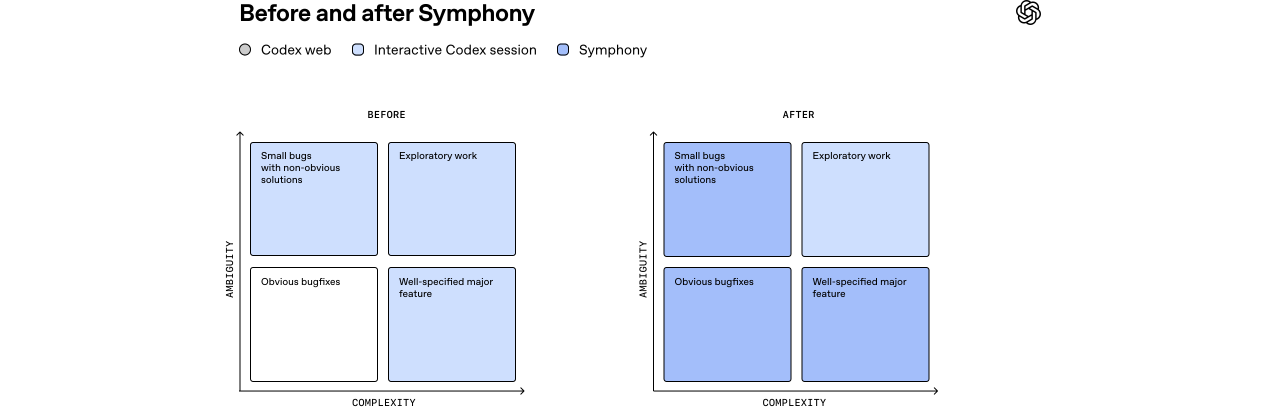
After implementing Symphony, we delegate more work to agents and focus on harder, more exploratory tasks.
Progress comes with new, different problems
Operating at this level comes with tradeoffs. When we moved from steering agents interactively to assigning them work at the ticket level, we lost the ability to constantly nudge them mid-flight and course-correct when needed. Sometimes the agent produced something that completely missed the mark. That was useful—those failures revealed gaps in the system and helped us make it more robust.
Instead of patching the result manually, we added guardrails and skills so the agents could succeed the next time. Over time, this led us to add new capabilities to our harness, like running end-to-end tests, driving the app through Chrome DevTools, and managing QA smoke tests. We significantly improved our documentation and clarified what good looks like.
Not every task fits the Symphony style of work. Some problems still require engineers working directly with interactive Codex sessions, especially ambiguous problems or work that requires strong judgment and expertise. In practice, these are usually the most interesting and enjoyable tasks for our engineers to spend time on.
The difference is that Symphony can handle the bulk of routine implementation work. That lets engineers focus on a single hard problem at a time instead of constantly context-switching between smaller tasks.
We also learned that treating agents as rigid nodes in a state machine doesn’t work well. Models get smarter and can solve bigger problems than the box we try to fit them in. Our early versions of agentic work was only asking Codex to implement the task. That approach proved too limiting. Codex is perfectly capable of creating multiple PRs as well as reading review feedback and addressing it. So we gave it tools—gh CLI, skills to read CI logs, etc.—and now we can ask Codex to do more, like closing old PRs or pulling reports on completed vs. abandoned work. These types of tasks fell way outside the initial feature implementation box.
So we eventually moved toward giving agents objectives instead of strict transitions, much like a good manager would assign a goal to a direct report on their team. The power of models comes from their ability to reason, so give them tools and context and let them cook.
Using Symphony to build Symphony
When you open the Symphony repository,(opens in a new window) the first thing you’ll notice is that Symphony is technically just a SPEC.md file—a definition of the problem and the intended solution. Rather than building a complex supervision system, we defined the problem and intended solutions, giving agents high-level steering.
Markdown
`
1
Symphony Service Specification
2
3
Status: Draft v1 (language-agnostic)
4
5
Purpose: Define a service that orchestrates coding agents to get project work done.
6
7
1. Problem Statement
8
9
Symphony is a long-running automation service that continuously reads work from an issue tracker
10
(Linear in this specification version), creates an isolated workspace for each issue, and runs a
11
coding agent session for that issue inside the workspace.
12
13
The service solves four operational problems:
14
15
- It turns issue execution into a repeatable daemon workflow instead of manual scripts.
16
- It isolates agent execution in per-issue workspaces so agent commands run only inside per-issue
17
workspace directories.
18
- It keeps the workflow policy in-repo (
WORKFLOW.md) so teams version the agent prompt and runtime
19
settings with their code.
20
- It provides enough observability to operate and debug multiple concurrent agent runs.
21
22
Implementations are expected to document their trust and safety posture explicitly. This
23
specification does not require a single approval, sandbox, or operator-confirmation policy; some
24
implementations may target trusted environments with a high-trust configuration, while others may
25
require stricter approvals or sandboxing.
26
27
Important boundary:
28
29
- Symphony is a scheduler/runner and tracker reader.
30
- Ticket writes (state transitions, comments, PR links) are typically performed by the coding agent
31
using tools available in the workflow/runtime environment.
32
- A successful run may end at a workflow-defined handoff state (for example
Human Review), not
33
necessarily Done.
34
35
2. Goals and Non-Goals
36
37
2.1 Goals
38
39
- Poll the issue tracker on a fixed cadence and dispatch work with bounded concurrency.
40
- Maintain a single authoritative orchestrator state for dispatch, retries, and reconciliation.
41
- Create deterministic per-issue workspaces and preserve them across runs.
42
- Stop active runs when issue state changes make them ineligible.
43
- Recover from transient failures with exponential backoff.
44
- Load runtime behavior from a repository-owned
WORKFLOW.mdcontract.
45
- Expose operator-visible observability (at minimum structured logs).
46
- Support restart recovery without requiring a persistent database.
47
48
2.2 Non-Goals
49
50
- Rich web UI or multi-tenant control plane.
51
- Prescribing a specific dashboard or terminal UI implementation.
52
- General-purpose workflow engine or distributed job scheduler.
53
- Built-in business logic for how to edit tickets, PRs, or comments. (That logic lives in the
54
workflow prompt and agent tooling.)
55
- Mandating strong sandbox controls beyond what the coding agent and host OS provide.
56
- Mandating a single default approval, sandbox, or operator-confirmation posture for all
57
implementations.
58
59
3. System Overview
60
61
3.1 Main Components
62
63
Workflow Loader
64
- Reads
WORKFLOW.md.
65
- Parses YAML front matter and prompt body.
66
- Returns
{config, prompt_template}.
67
68
Config Layer
69
- Exposes typed getters for workflow config values.
70
- Applies defaults and environment variable indirection.
71
- Performs validation used by the orchestrator before dispatch.
72
73
Issue Tracker Client
74
- Fetches candidate issues in active states.
75
- Fetches current states for specific issue IDs (reconciliation).
76
- Fetches terminal-state issues during startup cleanup.
77
- Normalizes tracker payloads into a stable issue model.
78
79
Orchestrator
80
- Owns the poll tick.
81
- Owns the in-memory runtime state.
82
- Decides which issues to dispatch, retry, stop, or release.
83
- Tracks session metrics and retry queue state.
84
85
Workspace Manager
86
- Maps issue identifiers to workspace paths.
87
- Ensures per-issue workspace directories exist.
88
- Runs workspace lifecycle hooks.
89
- Cleans workspaces for terminal issues.
90
91
Agent Runner
92
- Creates workspace.
93
- Builds prompt from issue + workflow template.
94
- Launches the coding agent app-server client.
95
- Streams agent updates back to the orchestrator.
96
97
Status Surface(optional)
98
- Presents human-readable runtime status (for example terminal output, dashboard, or other
99
operator-facing view).
100
101
Logging
102
- Emits structured runtime logs to one or more configured sinks.
103
104
3.2 Abstraction Levels
105
106
Symphony is easiest to port when kept in these layers:
107
108
Policy Layer(repo-defined)
109
WORKFLOW.mdprompt body.
110
- Team-specific rules for ticket handling, validation, and handoff.
111
112
Configuration Layer(typed getters)
113
- Parses front matter into typed runtime settings.
114
- Handles defaults, environment tokens, and path normalization.
115
116
Coordination Layer(orchestrator)
117
- Polling loop, issue eligibility, concurrency, retries, reconciliation.
118
119
Execution Layer(workspace + agent subprocess)
120
- Filesystem lifecycle, workspace preparation, coding-agent protocol.
121
122
Integration Layer(Linear adapter)
123
- API calls and normalization for tracker data.
124
125
Observability Layer(logs + optional status surface)
126
- Operator visibility into orchestrator and agent behavior.
127
128
3.3 External Dependencies
129
130
- Issue tracker API (Linear for
tracker.kind: linearin this specification version).
131
- Local filesystem for workspaces and logs.
132
- Optional workspace population tooling (for example Git CLI, if used).
133
- Coding-agent executable that supports JSON-RPC-like app-server mode over stdio.
134
- Host environment authentication for the issue tracker and coding agent.
135
136
4. Core Domain Model
137
138
4.1 Entities
139
140
4.1.1 Issue
141
142
Normalized issue record used by orchestration, prompt rendering, and observability output.
143
144
Fields:
145
146
id(string)
147
- Stable tracker-internal ID.
148
identifier(string)
149
- Human-readable ticket key (example:
ABC-123).
150
title(string)
151
description(string or null)
152
priority(integer or null)
153
- Lower numbers are higher priority in dispatch sorting.
154
state(string)
155
- Current tracker state name.
156
branch_name(string or null)
157
- Tracker-provided branch metadata if available.
158
url(string or null)
159
labels(list of strings)
160
- Normalized to lowercase.
161
blocked_by(list of blocker refs)
162
- Each blocker ref contains:
163
id(string or null)
164
identifier(string or null)
165
state(string or null)
166
created_at(timestamp or null)
167
updated_at(timestamp or null)
168
169
4.1.2 Workflow Definition
170
171
Parsed WORKFLOW.md payload:
172
173
config(map)
174
- YAML front matter root object.
175
prompt_template(string)
176
- Markdown body after front matter, trimmed.
177
178
4.1.3 Service Config (Typed View)
179
180
Typed runtime values derived from WorkflowDefinition.config plus environment resolution.
181
182
Examples:
183
184
- poll interval
185
- workspace root
186
- active and terminal issue states
187
- concurrency limits
188
- coding-agent executable/args/timeouts
189
- workspace hooks
190
191
4.1.4 Workspace
192
193
Filesystem workspace assigned to one issue identifier.
194
195
Fields (logical):
196
197
path(workspace path; current runtime typically uses absolute paths, but relative roots are
198
possible if configured without path separators)
199
workspace_key(sanitized issue identifier)
200
created_now(boolean, used to gateafter_createhook)
201
202
4.1.5 Run Attempt
203
204
One execution attempt for one issue.
205
206
Fields (logical):
207
208
issue_id
209
issue_identifier
210
attempt(integer or null,nullfor first run,>=1for retries/continuation)
211
workspace_path
212
started_at
213
status
214
error(optional)
215
216
4.1.6 Live Session (Agent Session Metadata)
217
218
State tracked while a coding-agent subprocess is running.
219
220
Fields:
221
222
session_id(string,<thread_id>-<turn_id>)
223
thread_id(string)
224
turn_id(string)
225
codex_app_server_pid(string or null)
226
last_codex_event(string/enum or null)
227
last_codex_timestamp(timestamp or null)
228
last_codex_message(summarized payload)
229
codex_input_tokens(integer)
230
codex_output_tokens(integer)
231
codex_total_tokens(integer)
232
last_reported_input_tokens(integer)
233
last_reported_output_tokens(integer)
234
last_reported_total_tokens(integer)
235
turn_count(integer)
236
- Number of coding-agent turns started within the current worker lifetime.
237
238
4.1.7 Retry Entry
239
240
Scheduled retry state for an issue.
241
242
Fields:
243
244
issue_id
245
identifier(best-effort human ID for status surfaces/logs)
246
attempt(integer, 1-based for retry queue)
247
due_at_ms(monotonic clock timestamp)
248
timer_handle(runtime-specific timer reference)
249
error(string or null)
250
251
4.1.8 Orchestrator Runtime State
252
253
Single authoritative in-memory state owned by the orchestrator.
254
255
Fields:
256
257
poll_interval_ms(current effective poll interval)
258
max_concurrent_agents(current effective global concurrency limit)
259
running(mapissue_id -> running entry)
260
claimed(set of issue IDs reserved/running/retrying)
261
retry_attempts(mapissue_id -> RetryEntry)
262
completed(set of issue IDs; bookkeeping only, not dispatch gating)
263
codex_totals(aggregate tokens + runtime seconds)
264
codex_rate_limits(latest rate-limit snapshot from agent events)
265
266
4.2 Stable Identifiers and Normalization Rules
267
268
Issue ID
269
- Use for tracker lookups and internal map keys.
270
Issue Identifier
271
- Use for human-readable logs and workspace naming.
272
Workspace Key
273
- Derive from
issue.identifierby replacing any character not in[A-Za-z0-9._-]with_.
274
- Use the sanitized value for the workspace directory name.
275
Normalized Issue State
276
- Compare states after
lowercase.
277
Session ID
278
- Compose from coding-agent
thread_idandturn_idas<thread_id>-<turn_id>.
279
280
5. Workflow Specification (Repository Contract)
281
282
5.1 File Discovery and Path Resolution
283
284
Workflow file path precedence:
285
286
- Explicit application/runtime setting (set by CLI startup path).
287
- Default:
WORKFLOW.mdin the current process working directory.
288
289
Loader behavior:
290
291
- If the file cannot be read, return
missing_workflow_fileerror.
292
- The workflow file is expected to be repository-owned and version-controlled.
293
294
5.2 File Format
295
296
WORKFLOW.md is a Markdown file with optional YAML front matter.
297
298
Design note:
299
300
WORKFLOW.mdshould be self-contained enough to describe and run different workflows (prompt,
301
runtime settings, hooks, and tracker selection/config) without requiring out-of-band
302
service-specific configuration.
303
304
Parsing rules:
305
306
- If file starts with
---, parse lines until the next---as YAML front matter.
307
- Remaining lines become the prompt body.
308
- If front matter is absent, treat the entire file as prompt body and use an empty config map.
309
- YAML front matter must decode to a map/object; non-map YAML is an error.
310
- Prompt body is trimmed before use.
311
312
Returned workflow object:
313
314
config: front matter root object (not nested under aconfigkey).
315
prompt_template: trimmed Markdown body.
316
317
5.3 Front Matter Schema
318
319
Top-level keys:
320
321
tracker
322
polling
323
workspace
324
hooks
325
agent
326
codex
327
328
Unknown keys should be ignored for forward compatibility.
329
330
Note:
331
332
- The workflow front matter is extensible. Optional extensions may define additional top-level keys
333
(for example server) without changing the core schema above.
334
- Extensions should document their field schema, defaults, validation rules, and whether changes
335
apply dynamically or require restart.
336
- Common extension:
server.port(integer) enables the optional HTTP server described in Section
337
13.7.
338
339
5.3.1 tracker (object)
340
341
Fields:
342
343
kind(string)
344
- Required for dispatch.
345
- Current supported value:
linear
346
endpoint(string)
347
- Default for
tracker.kind == "linear":https://api.linear.app/graphql
348
api_key(string)
349
- May be a literal token or
$VAR_NAME.
350
- Canonical environment variable for
tracker.kind == "linear":LINEAR_API_KEY.
351
- If
$VAR_NAMEresolves to an empty string, treat the key as missing.
352
project_slug(string)
353
- Required for dispatch when
tracker.kind == "linear".
354
active_states(list of strings)
355
- Default:
Todo,In Progress
356
terminal_states(list of strings)
357
- Default:
Closed,Cancelled,Canceled,Duplicate,Done
358
359
5.3.2 polling (object)
360
361
Fields:
362
363
interval_ms(integer or string integer)
364
- Default:
30000
365
- Changes should be re-applied at runtime and affect future tick scheduling without restart.
366
367
5.3.3 workspace (object)
368
369
Fields:
370
371
root(path string or$VAR)
372
- Default:
<system-temp>/symphony_workspaces
373
~and strings containing path separators are expanded.
374
- Bare strings without path separators are preserved as-is (relative roots are allowed but
375
discouraged).
376
377
5.3.4 hooks (object)
378
379
Fields:
380
381
after_create(multiline shell script string, optional)
382
- Runs only when a workspace directory is newly created.
383
- Failure aborts workspace creation.
384
before_run(multiline shell script string, optional)
385
- Runs before each agent attempt after workspace preparation and before launching the coding
386
agent.
387
- Failure aborts the current attempt.
388
after_run(multiline shell script string, optional)
389
- Runs after each agent attempt (success, failure, timeout, or cancellation) once the workspace
390
exists.
391
- Failure is logged but ignored.
392
before_remove(multiline shell script string, optional)
393
- Runs before workspace deletion if the directory exists.
394
- Failure is logged but ignored; cleanup still proceeds.
395
timeout_ms(integer, optional)
396
- Default:
60000
397
- Applies to all workspace hooks.
398
- Non-positive values should be treated as invalid and fall back to the default.
399
- Changes should be re-applied at runtime for future hook executions.
400
401
5.3.5 agent (object)
402
403
Fields:
404
405
max_concurrent_agents(integer or string integer)
406
- Default:
10
407
- Changes should be re-applied at runtime and affect subsequent dispatch decisions.
408
max_retry_backoff_ms(integer or string integer)
409
- Default:
300000(5 minutes)
410
- Changes should be re-applied at runtime and affect future retry scheduling.
411
max_concurrent_agents_by_state(mapstate_name -> positive integer)
412
- Default: empty map.
413
- State keys are normalized (
lowercase) for lookup.
414
- Invalid entries (non-positive or non-numeric) are ignored.
415
416
5.3.6 codex (object)
417
418
Fields:
419
420
For Codex-owned config values such as approval_policy, thread_sandbox, and
421
turn_sandbox_policy, supported values are defined by the targeted Codex app-server version.
422
Implementors should treat them as pass-through Codex config values rather than relying on a
423
hand-maintained enum in this spec. To inspect the installed Codex schema, run
424
codex app-server generate-json-schema --out <dir> and inspect the relevant definitions referenced
425
by v2/ThreadStartParams.json and v2/TurnStartParams.json. Implementations may validate these
426
fields locally if they want stricter startup checks.
427
428
command(string shell command)
429
- Default:
codex app-server
430
- The runtime launches this command via
bash -lcin the workspace directory.
431
- The launched process must speak a compatible app-server protocol over stdio.
432
approval_policy(CodexAskForApprovalvalue)
433
- Default: implementation-defined.
434
thread_sandbox(CodexSandboxModevalue)
435
- Default: implementation-defined.
436
turn_sandbox_policy(CodexSandboxPolicyvalue)
437
- Default: implementation-defined.
438
turn_timeout_ms(integer)
439
- Default:
3600000(1 hour)
440
read_timeout_ms(integer)
441
- Default:
5000
442
stall_timeout_ms(integer)
443
- Default:
300000(5 minutes)
444
- If
<= 0, stall detection is disabled.
445
446
5.4 Prompt Template Contract
447
448
The Markdown body of WORKFLOW.md is the per-issue prompt template.
449
450
Rendering requirements:
451
452
- Use a strict template engine (Liquid-compatible semantics are sufficient).
453
- Unknown variables must fail rendering.
454
- Unknown filters must fail rendering.
455
456
Template input variables:
457
458
issue(object)
459
- Includes all normalized issue fields, including labels and blockers.
460
attempt(integer or null)
461
null/absent on first attempt.
462
- Integer on retry or continuation run.
463
464
Fallback prompt behavior:
465
466
- If the workflow prompt body is empty, the runtime may use a minimal default prompt
467
(You are working on an issue from Linear.).
468
- Workflow file read/parse failures are configuration/validation errors and should not silently fall
469
back to a prompt.
470
471
5.5 Workflow Validation and Error Surface
472
473
Error classes:
474
475
missing_workflow_file
476
workflow_parse_error
477
workflow_front_matter_not_a_map
478
template_parse_error(during prompt rendering)
479
template_render_error(unknown variable/filter, invalid interpolation)
480
481
Dispatch gating behavior:
482
483
- Workflow file read/YAML errors block new dispatches until fixed.
484
- Template errors fail only the affected run attempt.
485
486
6. Configuration Specification
487
488
6.1 Source Precedence and Resolution Semantics
489
490
Configuration precedence:
491
492
- Workflow file path selection (runtime setting -> cwd default).
493
- YAML front matter values.
494
- Environment indirection via
$VAR_NAMEinside selected YAML values.
495
- Built-in defaults.
496
497
Value coercion semantics:
498
499
- Path/command fields support:
500
~home expansion
501
$VARexpansion for env-backed path values
502
- Apply expansion only to values intended to be local filesystem paths; do not rewrite URIs or
503
arbitrary shell command strings.
504
505
6.2 Dynamic Reload Semantics
506
507
Dynamic reload is required:
508
509
- The software should watch
WORKFLOW.mdfor changes.
510
- On change, it should re-read and re-apply workflow config and prompt template without restart.
511
- The software should attempt to adjust live behavior to the new config (for example polling
512
cadence, concurrency limits, active/terminal states, codex settings, workspace paths/hooks, and
513
prompt content for future runs).
514
- Reloaded config applies to future dispatch, retry scheduling, reconciliation decisions, hook
515
execution, and agent launches.
516
- Implementations are not required to restart in-flight agent sessions automatically when config
517
changes.
518
- Extensions that manage their own listeners/resources (for example an HTTP server port change) may
519
require restart unless the implementation explicitly supports live rebind.
520
- Implementations should also re-validate/reload defensively during runtime operations (for example
521
before dispatch) in case filesystem watch events are missed.
522
- Invalid reloads should not crash the service; keep operating with the last known good effective
523
configuration and emit an operator-visible error.
524
525
6.3 Dispatch Preflight Validation
526
527
This validation is a scheduler preflight run before attempting to dispatch new work. It validates
528
the workflow/config needed to poll and launch workers, not a full audit of all possible workflow
529
behavior.
530
531
Startup validation:
532
533
- Validate configuration before starting the scheduling loop.
534
- If startup validation fails, fail startup and emit an operator-visible error.
535
536
Per-tick dispatch validation:
537
538
- Re-validate before each dispatch cycle.
539
- If validation fails, skip dispatch for that tick, keep reconciliation active, and emit an
540
operator-visible error.
541
542
Validation checks:
543
544
- Workflow file can be loaded and parsed.
545
tracker.kindis present and supported.
546
tracker.api_keyis present after$resolution.
547
tracker.project_slugis present when required by the selected tracker kind.
548
codex.commandis present and non-empty.
549
550
6.4 Config Fields Summary (Cheat Sheet)
551
552
This section is intentionally redundant so a coding agent can implement the config layer quickly.
553
554
tracker.kind: string, required, currentlylinear
555
tracker.endpoint: string, defaulthttps://api.linear.app/graphqlwhentracker.kind=linear
556
tracker.api_key: string or$VAR, canonical envLINEAR_API_KEYwhentracker.kind=linear
557
tracker.project_slug: string, required whentracker.kind=linear
558
tracker.active_states: list of strings, default["Todo", "In Progress"]
559
tracker.terminal_states: list of strings, default["Closed", "Cancelled", "Canceled", "Duplicate", "Done"]
560
polling.interval_ms: integer, default30000
561
workspace.root: path, default<system-temp>/symphony_workspaces
562
worker.ssh_hosts(extension): list of SSH host strings, optional; when omitted, work runs
563
locally
564
worker.max_concurrent_agents_per_host(extension): positive integer, optional; shared per-host
565
cap applied across configured SSH hosts
566
hooks.after_create: shell script or null
567
hooks.before_run: shell script or null
568
hooks.after_run: shell script or null
569
hooks.before_remove: shell script or null
570
hooks.timeout_ms: integer, default60000
571
agent.max_concurrent_agents: integer, default10
572
agent.max_turns: integer, default20
573
agent.max_retry_backoff_ms: integer, default300000(5m)
574
agent.max_concurrent_agents_by_state: map of positive integers, default{}
575
codex.command: shell command string, defaultcodex app-server
576
codex.approval_policy: CodexAskForApprovalvalue, default implementation-defined
577
codex.thread_sandbox: CodexSandboxModevalue, default implementation-defined
578
codex.turn_sandbox_policy: CodexSandboxPolicyvalue, default implementation-defined
579
codex.turn_timeout_ms: integer, default3600000
580
codex.read_timeout_ms: integer, default5000
581
codex.stall_timeout_ms: integer, default300000
582
server.port(extension): integer, optional; enables the optional HTTP server,0may be used
583
for ephemeral local bind, and CLI --port overrides it
584
585
7. Orchestration State Machine
586
587
The orchestrator is the only component that mutates scheduling state. All worker outcomes are
588
reported back to it and converted into explicit state transitions.
589
590
7.1 Issue Orchestration States
591
592
This is not the same as tracker states (Todo, In Progress, etc.). This is the service's internal
593
claim state.
594
595
Unclaimed
596
- Issue is not running and has no retry scheduled.
597
598
Claimed
599
- Orchestrator has reserved the issue to prevent duplicate dispatch.
600
- In practice, claimed issues are either
RunningorRetryQueued.
601
602
Running
603
- Worker task exists and the issue is tracked in
runningmap.
604
605
RetryQueued
606
- Worker is not running, but a retry timer exists in
retry_attempts.
607
608
Released
609
- Claim removed because issue is terminal, non-active, missing, or retry path completed without
610
re-dispatch.
611
612
Important nuance:
613
614
- A successful worker exit does not mean the issue is done forever.
615
- The worker may continue through multiple back-to-back coding-agent turns before it exits.
616
- After each normal turn completion, the worker re-checks the tracker issue state.
617
- If the issue is still in an active state, the worker should start another turn on the same live
618
coding-agent thread in the same workspace, up to agent.max_turns.
619
- The first turn should use the full rendered task prompt.
620
- Continuation turns should send only continuation guidance to the existing thread, not resend the
621
original task prompt that is already present in thread history.
622
- Once the worker exits normally, the orchestrator still schedules a short continuation retry
623
(about 1 second) so it can re-check whether the issue remains active and needs another worker
624
session.
625
626
7.2 Run Attempt Lifecycle
627
628
A run attempt transitions through these phases:
629
630
PreparingWorkspace
631
BuildingPrompt
632
LaunchingAgentProcess
633
InitializingSession
634
StreamingTurn
635
Finishing
636
Succeeded
637
Failed
638
TimedOut
639
Stalled
640
CanceledByReconciliation
641
642
Distinct terminal reasons are important because retry logic and logs differ.
643
644
7.3 Transition Triggers
645
646
Poll Tick
647
- Reconcile active runs.
648
- Validate config.
649
- Fetch candidate issues.
650
- Dispatch until slots are exhausted.
651
652
Worker Exit (normal)
653
- Remove running entry.
654
- Update aggregate runtime totals.
655
- Schedule continuation retry (attempt
1) after the worker exhausts or finishes its in-process
656
turn loop.
657
658
Worker Exit (abnormal)
659
- Remove running entry.
660
- Update aggregate runtime totals.
661
- Schedule exponential-backoff retry.
662
663
Codex Update Event
664
- Update live session fields, token counters, and rate limits.
665
666
Retry Timer Fired
667
- Re-fetch active candidates and attempt re-dispatch, or release claim if no longer eligible.
668
669
Reconciliation State Refresh
670
- Stop runs whose issue states are terminal or no longer active.
671
672
Stall Timeout
673
- Kill worker and schedule retry.
674
675
7.4 Idempotency and Recovery Rules
676
677
- The orchestrator serializes state mutations through one authority to avoid duplicate dispatch.
678
claimedandrunningchecks are required before launching any worker.
679
- Reconciliation runs before dispatch on every tick.
680
- Restart recovery is tracker-driven and filesystem-driven (no durable orchestrator DB required).
681
- Startup terminal cleanup removes stale workspaces for issues already in terminal states.
682
683
8. Polling, Scheduling, and Reconciliation
684
685
8.1 Poll Loop
686
687
At startup, the service validates config, performs startup cleanup, schedules an immediate tick, and
688
then repeats every polling.interval_ms.
689
690
The effective poll interval should be updated when workflow config changes are re-applied.
691
692
Tick sequence:
693
694
- Reconcile running issues.
695
- Run dispatch preflight validation.
696
- Fetch candidate issues from tracker using active states.
697
- Sort issues by dispatch priority.
698
- Dispatch eligible issues while slots remain.
699
- Notify observability/status consumers of state changes.
700
701
If per-tick validation fails, dispatch is skipped for that tick, but reconciliation still happens
702
first.
703
704
8.2 Candidate Selection Rules
705
706
An issue is dispatch-eligible only if all are true:
707
708
- It has
id,identifier,title, andstate.
709
- Its state is in
active_statesand not interminal_states.
710
- It is not already in
running.
711
- It is not already in
claimed.
712
- Global concurrency slots are available.
713
- Per-state concurrency slots are available.
714
- Blocker rule for
Todostate passes:
715
- If the issue state is
Todo, do not dispatch when any blocker is non-terminal.
716
717
Sorting order (stable intent):
718
719
priorityascending (1..4 are preferred; null/unknown sorts last)
720
created_atoldest first
721
identifierlexicographic tie-breaker
722
723
8.3 Concurrency Control
724
725
Global limit:
726
727
available_slots = max(max_concurrent_agents - running_count, 0)
728
729
Per-state limit:
730
731
max_concurrent_agents_by_state[state]if present (state key normalized)
732
- otherwise fallback to global limit
733
734
The runtime counts issues by their current tracked state in the running map.
735
736
Optional SSH host limit:
737
738
- When
worker.max_concurrent_agents_per_hostis set, each configured SSH host may run at most
739
that many concurrent agents at once.
740
- Hosts at that cap are skipped for new dispatch until capacity frees up.
741
742
8.4 Retry and Backoff
743
744
Retry entry creation:
745
746
- Cancel any existing retry timer for the same issue.
747
- Store
attempt,identifier,error,due_at_ms, and new timer handle.
748
749
Backoff formula:
750
751
- Normal continuation retries after a clean worker exit use a short fixed delay of
1000ms.
752
- Failure-driven retries use
delay = min(10000 * 2^(attempt - 1), agent.max_retry_backoff_ms).
753
- Power is capped by the configured max retry backoff (default
300000/ 5m).
754
755
Retry handling behavior:
756
757
- Fetch active candidate issues (not all issues).
758
- Find the specific issue by
issue_id.
759
- If not found, release claim.
760
- If found and still candidate-eligible:
761
- Dispatch if slots are available.
762
- Otherwise requeue with error
no available orchestrator slots.
763
- If found but no longer active, release claim.
764
765
Note:
766
767
- Terminal-state workspace cleanup is handled by startup cleanup and active-run reconciliation
768
(including terminal transitions for currently running issues).
769
- Retry handling mainly operates on active candidates and releases claims when the issue is absent,
770
rather than performing terminal cleanup itself.
771
772
8.5 Active Run Reconciliation
773
774
Reconciliation runs every tick and has two parts.
775
776
Part A: Stall detection
777
778
- For each running issue, compute
elapsed_mssince:
779
last_codex_timestampif any event has been seen, else
780
started_at
781
- If
elapsed_ms > codex.stall_timeout_ms, terminate the worker and queue a retry.
782
- If
stall_timeout_ms <= 0, skip stall detection entirely.
783
784
Part B: Tracker state refresh
785
786
- Fetch current issue states for all running issue IDs.
787
- For each running issue:
788
- If tracker state is terminal: terminate worker and clean workspace.
789
- If tracker state is still active: update the in-memory issue snapshot.
790
- If tracker state is neither active nor terminal: terminate worker without workspace cleanup.
791
- If state refresh fails, keep workers running and try again on the next tick.
792
793
8.6 Startup Terminal Workspace Cleanup
794
795
When the service starts:
796
797
- Query tracker for issues in terminal states.
798
- For each returned issue identifier, remove the corresponding workspace directory.
799
- If the terminal-issues fetch fails, log a warning and continue startup.
800
801
This prevents stale terminal workspaces from accumulating after restarts.
802
803
9. Workspace Management and Safety
804
805
9.1 Workspace Layout
806
807
Workspace root:
808
809
workspace.root(normalized path; the current config layer expands path-like values and preserves
810
bare relative names)
811
812
Per-issue workspace path:
813
814
<workspace.root>/<sanitized_issue_identifier>
815
816
Workspace persistence:
817
818
- Workspaces are reused across runs for the same issue.
819
- Successful runs do not auto-delete workspaces.
820
821
9.2 Workspace Creation and Reuse
822
823
Input: issue.identifier
824
825
Algorithm summary:
826
827
- Sanitize identifier to
workspace_key.
828
- Compute workspace path under workspace root.
829
- Ensure the workspace path exists as a directory.
830
- Mark
created_now=trueonly if the directory was created during this call; otherwise
831
created_now=false.
832
- If
created_now=true, runafter_createhook if configured.
833
834
Notes:
835
836
- This section does not assume any specific repository/VCS workflow.
837
- Workspace preparation beyond directory creation (for example dependency bootstrap, checkout/sync,
838
code generation) is implementation-defined and is typically handled via hooks.
839
840
9.3 Optional Workspace Population (Implementation-Defined)
841
842
The spec does not require any built-in VCS or repository bootstrap behavior.
843
844
Implementations may populate or synchronize the workspace using implementation-defined logic and/or
845
hooks (for example after_create and/or before_run).
846
847
Failure handling:
848
849
- Workspace population/synchronization failures return an error for the current attempt.
850
- If failure happens while creating a brand-new workspace, implementations may remove the partially
851
prepared directory.
852
- Reused workspaces should not be destructively reset on population failure unless that policy is
853
explicitly chosen and documented.
854
855
9.4 Workspace Hooks
856
857
Supported hooks:
858
859
hooks.after_create
860
hooks.before_run
861
hooks.after_run
862
hooks.before_remove
863
864
Execution contract:
865
866
- Execute in a local shell context appropriate to the host OS, with the workspace directory as
867
cwd.
868
- On POSIX systems,
sh -lc <script>(or a stricter equivalent such asbash -lc <script>) is a
869
conforming default.
870
- Hook timeout uses
hooks.timeout_ms; default:60000 ms.
871
- Log hook start, failures, and timeouts.
872
873
Failure semantics:
874
875
after_createfailure or timeout is fatal to workspace creation.
876
before_runfailure or timeout is fatal to the current run attempt.
877
after_runfailure or timeout is logged and ignored.
878
before_removefailure or timeout is logged and ignored.
879
880
9.5 Safety Invariants
881
882
This is the most important portability constraint.
883
884
Invariant 1: Run the coding agent only in the per-issue workspace path.
885
886
- Before launching the coding-agent subprocess, validate:
887
cwd == workspace_path
888
889
Invariant 2: Workspace path must stay inside workspace root.
890
891
- Normalize both paths to absolute.
892
- Require
workspace_pathto haveworkspace_rootas a prefix directory.
893
- Reject any path outside the workspace root.
894
895
Invariant 3: Workspace key is sanitized.
896
897
- Only
[A-Za-z0-9._-]allowed in workspace directory names.
898
- Replace all other characters with
_.
899
900
10. Agent Runner Protocol (Coding Agent Integration)
901
902
This section defines the language-neutral contract for integrating a coding agent app-server.
903
904
Compatibility profile:
905
906
- The normative contract is message ordering, required behaviors, and the logical fields that must
907
be extracted (for example session IDs, completion state, approval handling, and usage/rate-limit
908
telemetry).
909
- Exact JSON field names may vary slightly across compatible app-server versions.
910
- Implementations should tolerate equivalent payload shapes when they carry the same logical
911
meaning, especially for nested IDs, approval requests, user-input-required signals, and
912
token/rate-limit metadata.
913
914
10.1 Launch Contract
915
916
Subprocess launch parameters:
917
918
- Command:
codex.command
919
- Invocation:
bash -lc <codex.command>
920
- Working directory: workspace path
921
- Stdout/stderr: separate streams
922
- Framing: line-delimited protocol messages on stdout (JSON-RPC-like JSON per line)
923
924
Notes:
925
926
- The default command is
codex app-server.
927
- Approval policy, cwd, and prompt are expressed in the protocol messages in Section 10.2.
928
929
Recommended additional process settings:
930
931
- Max line size: 10 MB (for safe buffering)
932
933
10.2 Session Startup Handshake
934
935
Reference: https://developers.openai.com/codex/app-server/
936
937
The client must send these protocol messages in order:
938
939
Illustrative startup transcript (equivalent payload shapes are acceptable if they preserve the same
940
semantics):
941
942
943

{"id":1,"method":"initialize","params":{"clientInfo":{"name":"symphony","version":"1.0"},"capabilities":{}}}

944

{"method":"initialized","params":{}}

945

{"id":2,"method":"thread/start","params":{"approvalPolicy":"<implementation-defined>","sandbox":"<implementation-defined>","cwd":"/abs/workspace"}}

946

{"id":3,"method":"turn/start","params":{"threadId":"<thread-id>","input":[{"type":"text","text":"<rendered prompt-or-continuation-guidance>"}],"cwd":"/abs/workspace","title":"ABC-123: Example","approvalPolicy":"<implementation-defined>","sandboxPolicy":{"type":"<implementation-defined>"}}}

947
948
949
initializerequest
950
- Params include:
951
clientInfoobject (for example{name, version})
952
capabilitiesobject (may be empty)
953
- If the targeted Codex app-server requires capability negotiation for dynamic tools, include the
954
necessary capability flag(s) here.
955
- Wait for response (
read_timeout_ms)
956
initializednotification
957
thread/startrequest
958
- Params include:
959
approvalPolicy= implementation-defined session approval policy value
960
sandbox= implementation-defined session sandbox value
961
cwd= absolute workspace path
962
- If optional client-side tools are implemented, include their advertised tool specs using the
963
protocol mechanism supported by the targeted Codex app-server version.
964
turn/startrequest
965
- Params include:
966
threadId
967
input= single text item containing rendered prompt for the first turn, or continuation
968
guidance for later turns on the same thread
969
cwd
970
title=<issue.identifier>: <issue.title>
971
approvalPolicy= implementation-defined turn approval policy value
972
sandboxPolicy= implementation-defined object-form sandbox policy payload when required by
973
the targeted app-server version
974
975
Session identifiers:
976
977
- Read
thread_idfromthread/startresultresult.thread.id
978
- Read
turn_idfrom eachturn/startresultresult.turn.id
979
- Emit
session_id = "<thread_id>-<turn_id>"
980
- Reuse the same
thread_idfor all continuation turns inside one worker run
981
982
10.3 Streaming Turn Processing
983
984
The client reads line-delimited messages until the turn terminates.
985
986
Completion conditions:
987
988
turn/completed-> success
989
turn/failed-> failure
990
turn/cancelled-> failure
991
- turn timeout (
turn_timeout_ms) -> failure
992
- subprocess exit -> failure
993
994
Continuation processing:
995
996
- If the worker decides to continue after a successful turn, it should issue another
turn/start
997
on the same live threadId.
998
- The app-server subprocess should remain alive across those continuation turns and be stopped only
999
when the worker run is ending.
1000
1001
Line handling requirements:
1002
1003
- Read protocol messages from stdout only.
1004
- Buffer partial stdout lines until newline arrives.
1005
- Attempt JSON parse on complete stdout lines.
1006
- Stderr is not part of the protocol stream:
1007
- ignore it or log it as diagnostics
1008
- do not attempt protocol JSON parsing on stderr
1009
1010
10.4 Emitted Runtime Events (Upstream to Orchestrator)
1011
1012
The app-server client emits structured events to the orchestrator callback. Each event should
1013
include:
1014
1015
event(enum/string)
1016
timestamp(UTC timestamp)
1017
codex_app_server_pid(if available)
1018
- optional
usagemap (token counts)
1019
- payload fields as needed
1020
1021
Important emitted events may include:
1022
1023
session_started
1024
startup_failed
1025
turn_completed
1026
turn_failed
1027
turn_cancelled
1028
turn_ended_with_error
1029
turn_input_required
1030
approval_auto_approved
1031
unsupported_tool_call
1032
notification
1033
other_message
1034
malformed
1035
1036
10.5 Approval, Tool Calls, and User Input Policy
1037
1038
Approval, sandbox, and user-input behavior is implementation-defined.
1039
1040
Policy requirements:
1041
1042
- Each implementation should document its chosen approval, sandbox, and operator-confirmation
1043
posture.
1044
- Approval requests and user-input-required events must not leave a run stalled indefinitely. An
1045
implementation should either satisfy them, surface them to an operator, auto-resolve them, or
1046
fail the run according to its documented policy.
1047
1048
Example high-trust behavior:
1049
1050
- Auto-approve command execution approvals for the session.
1051
- Auto-approve file-change approvals for the session.
1052
- Treat user-input-required turns as hard failure.
1053
1054
Unsupported dynamic tool calls:
1055
1056
- Supported dynamic tool calls that are explicitly implemented and advertised by the runtime should
1057
be handled according to their extension contract.
1058
- If the agent requests a dynamic tool call (
item/tool/call) that is not supported, return a tool
1059
failure response and continue the session.
1060
- This prevents the session from stalling on unsupported tool execution paths.
1061
1062
Optional client-side tool extension:
1063
1064
- An implementation may expose a limited set of client-side tools to the app-server session.
1065
- Current optional standardized tool:
linear_graphql.
1066
- If implemented, supported tools should be advertised to the app-server session during startup
1067
using the protocol mechanism supported by the targeted Codex app-server version.
1068
- Unsupported tool names should still return a failure result and continue the session.
1069
1070
linear_graphql extension contract:
1071
1072
- Purpose: execute a raw GraphQL query or mutation against Linear using Symphony's configured
1073
tracker auth for the current session.
1074
- Availability: only meaningful when
tracker.kind == "linear"and valid Linear auth is configured.
1075
- Preferred input shape:
1076
1077
1078

{

1079

"query": "single GraphQL query or mutation document",

1080

"variables": {

1081

"optional": "graphql variables object"

1082

}

1083

}

1084
1085
1086
querymust be a non-empty string.
1087
querymust contain exactly one GraphQL operation.
1088
variablesis optional and, when present, must be a JSON object.
1089
- Implementations may additionally accept a raw GraphQL query string as shorthand input.
1090
- Execute one GraphQL operation per tool call.
1091
- If the provided document contains multiple operations, reject the tool call as invalid input.
1092
operationNameselection is intentionally out of scope for this extension.
1093
- Reuse the configured Linear endpoint and auth from the active Symphony workflow/runtime config; do
1094
not require the coding agent to read raw tokens from disk.
1095
- Tool result semantics:
1096
- transport success + no top-level GraphQL
errors->success=true
1097
- top-level GraphQL
errorspresent ->success=false, but preserve the GraphQL response body
1098
for debugging
1099
- invalid input, missing auth, or transport failure ->
success=falsewith an error payload
1100
- Return the GraphQL response or error payload as structured tool output that the model can inspect
1101
in-session.
1102
1103
Illustrative responses (equivalent payload shapes are acceptable if they preserve the same outcome):
1104
1105
1106

{"id":"<approval-id>","result":{"approved":true}}

1107

{"id":"<tool-call-id>","result":{"success":false,"error":"unsupported_tool_call"}}

1108
1109
1110
Hard failure on user input requirement:
1111
1112
- If the agent requests user input, fail the run attempt immediately.
1113
- The client detects this via:
1114
- explicit method (
item/tool/requestUserInput), or
1115
- turn methods/flags indicating input is required.
1116
1117
10.6 Timeouts and Error Mapping
1118
1119
Timeouts:
1120
1121
codex.read_timeout_ms: request/response timeout during startup and sync requests
1122
codex.turn_timeout_ms: total turn stream timeout
1123
codex.stall_timeout_ms: enforced by orchestrator based on event inactivity
1124
1125
Error mapping (recommended normalized categories):
1126
1127
codex_not_found
1128
invalid_workspace_cwd
1129
response_timeout
1130
turn_timeout
1131
port_exit
1132
response_error
1133
turn_failed
1134
turn_cancelled
1135
turn_input_required
1136
1137
10.7 Agent Runner Contract
1138
1139
The Agent Runner wraps workspace + prompt + app-server client.
1140
1141
Behavior:
1142
1143
- Create/reuse workspace for issue.
1144
- Build prompt from workflow template.
1145
- Start app-server session.
1146
- Forward app-server events to orchestrator.
1147
- On any error, fail the worker attempt (the orchestrator will retry).
1148
1149
Note:
1150
1151
- Workspaces are intentionally preserved after successful runs.
1152
1153
11. Issue Tracker Integration Contract (Linear-Compatible)
1154
1155
11.1 Required Operations
1156
1157
An implementation must support these tracker adapter operations:
1158
1159
fetch_candidate_issues()
1160
- Return issues in configured active states for a configured project.
1161
1162
fetch_issues_by_states(state_names)
1163
- Used for startup terminal cleanup.
1164
1165
fetch_issue_states_by_ids(issue_ids)
1166
- Used for active-run reconciliation.
1167
1168
11.2 Query Semantics (Linear)
1169
1170
Linear-specific requirements for tracker.kind == "linear":
1171
1172
tracker.kind == "linear"
1173
- GraphQL endpoint (default
https://api.linear.app/graphql)
1174
- Auth token sent in
Authorizationheader
1175
tracker.project_slugmaps to Linear projectslugId
1176
- Candidate issue query filters project using
project: { slugId: { eq: $projectSlug } }
1177
- Issue-state refresh query uses GraphQL issue IDs with variable type
[ID!]
1178
- Pagination required for candidate issues
1179
- Page size default:
50
1180
- Network timeout:
30000 ms
1181
1182
Important:
1183
1184
- Linear GraphQL schema details can drift. Keep query construction isolated and test the exact query
1185
fields/types required by this specification.
1186
1187
A non-Linear implementation may change transport details, but the normalized outputs must match the
1188
domain model in Section 4.
1189
1190
11.3 Normalization Rules
1191
1192
Candidate issue normalization should produce fields listed in Section 4.1.1.
1193
1194
Additional normalization details:
1195
1196
labels-> lowercase strings
1197
blocked_by-> derived from inverse relations where relation type isblocks
1198
priority-> integer only (non-integers become null)
1199
created_atandupdated_at-> parse ISO-8601 timestamps
1200
1201
11.4 Error Handling Contract
1202
1203
Recommended error categories:
1204
1205
unsupported_tracker_kind
1206
missing_tracker_api_key
1207
missing_tracker_project_slug
1208
linear_api_request(transport failures)
1209
linear_api_status(non-200 HTTP)
1210
linear_graphql_errors
1211
linear_unknown_payload
1212
linear_missing_end_cursor(pagination integrity error)
1213
1214
Orchestrator behavior on tracker errors:
1215
1216
- Candidate fetch failure: log and skip dispatch for this tick.
1217
- Running-state refresh failure: log and keep active workers running.
1218
- Startup terminal cleanup failure: log warning and continue startup.
1219
1220
11.5 Tracker Writes (Important Boundary)
1221
1222
Symphony does not require first-class tracker write APIs in the orchestrator.
1223
1224
- Ticket mutations (state transitions, comments, PR metadata) are typically handled by the coding
1225
agent using tools defined by the workflow prompt.
1226
- The service remains a scheduler/runner and tracker reader.
1227
- Workflow-specific success often means "reached the next handoff state" (for example
1228
Human Review) rather than tracker terminal state Done.
1229
- If the optional
linear_graphqlclient-side tool extension is implemented, it is still part of
1230
the agent toolchain rather than orchestrator business logic.
1231
1232
12. Prompt Construction and Context Assembly
1233
1234
12.1 Inputs
1235
1236
Inputs to prompt rendering:
1237
1238
workflow.prompt_template
1239
- normalized
issueobject
1240
- optional
attemptinteger (retry/continuation metadata)
1241
1242
12.2 Rendering Rules
1243
1244
- Render with strict variable checking.
1245
- Render with strict filter checking.
1246
- Convert issue object keys to strings for template compatibility.
1247
- Preserve nested arrays/maps (labels, blockers) so templates can iterate.
1248
1249
12.3 Retry/Continuation Semantics
1250
1251
attempt should be passed to the template because the workflow prompt may provide different
1252
instructions for:
1253
1254
- first run (
attemptnull or absent)
1255
- continuation run after a successful prior session
1256
- retry after error/timeout/stall
1257
1258
12.4 Failure Semantics
1259
1260
If prompt rendering fails:
1261
1262
- Fail the run attempt immediately.
1263
- Let the orchestrator treat it like any other worker failure and decide retry behavior.
1264
1265
13. Logging, Status, and Observability
1266
1267
13.1 Logging Conventions
1268
1269
Required context fields for issue-related logs:
1270
1271
issue_id
1272
issue_identifier
1273
1274
Required context for coding-agent session lifecycle logs:
1275
1276
session_id
1277
1278
Message formatting requirements:
1279
1280
- Use stable
key=valuephrasing.
1281
- Include action outcome (
completed,failed,retrying, etc.).
1282
- Include concise failure reason when present.
1283
- Avoid logging large raw payloads unless necessary.
1284
1285
13.2 Logging Outputs and Sinks
1286
1287
The spec does not prescribe where logs must go (stderr, file, remote sink, etc.).
1288
1289
Requirements:
1290
1291
- Operators must be able to see startup/validation/dispatch failures without attaching a debugger.
1292
- Implementations may write to one or more sinks.
1293
- If a configured log sink fails, the service should continue running when possible and emit an
1294
operator-visible warning through any remaining sink.
1295
1296
13.3 Runtime Snapshot / Monitoring Interface (Optional but Recommended)
1297
1298
If the implementation exposes a synchronous runtime snapshot (for dashboards or monitoring), it
1299
should return:
1300
1301
running(list of running session rows)
1302
- each running row should include
turn_count
1303
retrying(list of retry queue rows)
1304
codex_totals
1305
input_tokens
1306
output_tokens
1307
total_tokens
1308
seconds_running(aggregate runtime seconds as of snapshot time, including active sessions)
1309
rate_limits(latest coding-agent rate limit payload, if available)
1310
1311
Recommended snapshot error modes:
1312
1313
timeout
1314
unavailable
1315
1316
13.4 Optional Human-Readable Status Surface
1317
1318
A human-readable status surface (terminal output, dashboard, etc.) is optional and
1319
implementation-defined.
1320
1321
If present, it should draw from orchestrator state/metrics only and must not be required for
1322
correctness.
1323
1324
13.5 Session Metrics and Token Accounting
1325
1326
Token accounting rules:
1327
1328
- Agent events may include token counts in multiple payload shapes.
1329
- Prefer absolute thread totals when available, such as:
1330
thread/tokenUsage/updatedpayloads
1331
total_token_usagewithin token-count wrapper events
1332
- Ignore delta-style payloads such as
last_token_usagefor dashboard/API totals.
1333
- Extract input/output/total token counts leniently from common field names within the selected
1334
payload.
1335
- For absolute totals, track deltas relative to last reported totals to avoid double-counting.
1336
- Do not treat generic
usagemaps as cumulative totals unless the event type defines them that
1337
way.
1338
- Accumulate aggregate totals in orchestrator state.
1339
1340
Runtime accounting:
1341
1342
- Runtime should be reported as a live aggregate at snapshot/render time.
1343
- Implementations may maintain a cumulative counter for ended sessions and add active-session
1344
elapsed time derived from running entries (for example started_at) when producing a
1345
snapshot/status view.
1346
- Add run duration seconds to the cumulative ended-session runtime when a session ends (normal exit
1347
or cancellation/termination).
1348
- Continuous background ticking of runtime totals is not required.
1349
1350
Rate-limit tracking:
1351
1352
- Track the latest rate-limit payload seen in any agent update.
1353
- Any human-readable presentation of rate-limit data is implementation-defined.
1354
1355
13.6 Humanized Agent Event Summaries (Optional)
1356
1357
Humanized summaries of raw agent protocol events are optional.
1358
1359
If implemented:
1360
1361
- Treat them as observability-only output.
1362
- Do not make orchestrator logic depend on humanized strings.
1363
`
The reference implementation is written in Elixir—because when code is effectively free, you can finally pick languages for their strengths, like Elixir's concurrency—but the core idea can be expressed in a simple Markdown document. We encourage you to point your favorite coding agent at the spec and have it implement its own version.
The first version of Symphony was just a Codex session running in tmux, polling Linear and spawning sub-agents for new tasks. It worked, but it wasn’t particularly reliable. The second version lived inside our main project repository, which was built with agents in mind. We had already built the agent harness to give agents the skills and context to do high quality work in this repo, so Symphony simply connects it all.
Once the basic functionality existed, we used Symphony to build Symphony.
When we internally demoed the system managing tasks and attaching its proof-of-work video, the reaction was overwhelmingly positive: our Symphony project channel grew, and teams across the organization started using it organically. Internal product market fit is a prerequisite for launching externally at OpenAI. Based on the usage we saw at OpenAI, it became clear we should share Symphony beyond company walls.
So we extracted the idea into a standalone SPEC.md and asked Codex to implement it. For the reference implementation, we chose Elixir, a relatively niche language with excellent primitives for orchestrating and supervising concurrent processes. Codex built the Elixir implementation in one shot, and we kept iterating on both spec and implementation from there. To polish the spec, we even asked Codex to implement it in several other languages—TypeScript, Go, Rust, Java, Python—and use the results to identify ambiguities and simplify the system. It succeeded in every language.
Through the process of building Symphony, we removed a lot of incidental complexity, like dependencies on specific repositories or Linear MCP. Symphony no longer depends on our internal repositories or workflows. The core approach became simple:
For every open task, guarantee that an agent is running in its own workspace.
In addition to helping with the active work, the development workflow is now something agents know and follow. The development workflow—work on an issue, check out a repo, put it in progress so the PM knows it's being worked on, add the PR, move it to the Review status, attach videos, etc.—is now captured in a simple WORKFLOW.md file. All of this is a process that humans followed, but it was never documented. Rather than relying on this implicit set of steps, we now document it, and Symphony ensures agents follow it. This lets us build agents that work alongside us. If we decide that agents should also attach self-reflection to finished work, we'll add that to the WORKFLOW.md, and Symphony will guide the agents to that step.
We also got to use Codex in app server mode(opens in a new window), a built-in headless mode for Codex. This mode allowed us to run Codex and talk to it programmatically via a well documented JSON-RPC API for things like starting a thread or reacting to turns. It’s more convenient and scalable than trying to interact with Codex via CLI or live tmux sessions.
Codex App Server was a perfect fit for our use case: we take advantage of the harness Codex provides while having knobs and hooks to plug into. For example, to avoid exposing the Linear access token to subagents, we use dynamic tool calls(opens in a new window) to expose the raw linear_graphql function that executes arbitrary requests against Linear, without relying on MCP or exposing the access token to containers.
What’s next
Symphony is an intentionally minimal orchestration layer. We’re open sourcing it to demonstrate the power of Codex App Server when paired with different workflow tools, like Linear. As such, we don't plan to maintain Symphony as a standalone product. Think of it as a reference implementation. Similar to how many developers pointed their coding agents at the harness engineering post to scaffold their repositories, we hope you point your favorite coding agent at the Symphony spec(opens in a new window) and repository(opens in a new window) to build your own versions tailored to your environments.
The power comes from Codex and its app server. Symphony was a way to connect Codex to Linear, two things we already used, to solve the work management problem. As coding agents become better at reasoning and following instructions, we suspect the bottleneck at other companies will shift from writing code toward managing agentic work, too. The exciting part is that the barrier to experimenting with these coding agent systems is now surprisingly low. You can just build things with Codex.
Community shoutouts
We're thrilled to see the engineering community using Symphony in the weeks since release, garnering over 15K GitHub stars(opens in a new window) as of April 23.